
Claude Code and Claude Cowork for Academic Writing and Research
If your paper depends on LaTeX, R, Python, or Git, I’d use Claude Code. If your work is mostly PDFs, notes, outlines, and revisions, I’d use Claude Cowork. That’s the core answer.
Here’s the short version:
- Claude Code fits file-based research projects
- Claude Cowork fits source-heavy reading and draft revision
- Both need manual checks for citations, quotes, methods, and claims
- For U.S. research, I’d keep PHI, student records, and IRB-covered data out unless use is approved
- A shared
CLAUDE.mdfile can help keep rules for style, citations, and workflow in one place
This comparison covers the parts most students and researchers care about:
- literature notes
- outlines
- methods and results writing
- citation checks
- long-draft revision
- Git and local file workflows
- review steps for sensitive data
One date matters here: Claude Cowork became generally available on April 9, 2026. So this is a current workflow comparison as of June 25, 2026.
Claude Cowork for Academics: Full Setup & Use Cases
sbb-itb-1831901
Quick Comparison
| Criteria | Claude Code | Claude Cowork |
|---|---|---|
| Best for | Local project work | reading, synthesis, and enhancing academic papers |
| Main input | LaTeX files, scripts, datasets, Git repos | PDFs, notes, drafts, reviewer comments |
| Local tool access | Yes | No |
| Best writing tasks | Methods, results, appendices, repo docs | Literature reviews, outlines, long-form edits |
| File behavior | Works inside your project files | Writes to project-folder files |
| Main risk | File changes can spread errors | Citation and quote mistakes |
| Best safeguard | Use Plan Mode before edits | Review task plan before run |
I’d think about it this way: one tool is closer to your terminal, and the other is closer to your reading pile.
That’s what the rest of the article breaks down.
Claude Code for file-based research and reproducible writing
Claude Code works best in academic projects built around LaTeX, scripts, datasets, and version control. It can read files, run commands, and operate inside the toolchain you already use. That makes it a strong fit for writing that needs to stay connected to source files and analysis output.
Best academic uses: LaTeX papers, methods sections, and analysis-linked drafts
Claude Code is at its best when manuscript text needs to match the analysis behind it. Say your Methods or Results section needs to describe work already stored in analysis/main.R. Claude Code can read the script itself and draft text that matches the results reported there.
It also handles the grind of LaTeX work well. That includes:
- cleaning BibTeX entries
- fixing cross-references between a main paper and its appendices
- iterating on TikZ diagrams through a compile, check, and revise cycle
It can also generate modelsummary tables from R output .
Where Claude Code fits in research workflows
For STEM and quantitative researchers, Claude Code fits neatly into the parts of a project that involve building, tracking, and revising. It supports native Git integration, so you can branch revisions, keep change history clean, and deal with merge conflicts in a more orderly way .
It can also draft README files, data dictionaries, and repository documentation for data repositories like Zenodo or Figshare .
A CLAUDE.md file at the project root can make day-to-day work much smoother. You can store your citation style, preferred LaTeX template, R package dependencies, and field-specific rules such as standard error clustering there. Claude Code reads this file at the start of each session, so it sticks to your project rules without needing the same instructions over and over .
Limits and safeguards for academic use
That same file access cuts both ways. If something goes wrong, errors can spread fast, so review is non-negotiable. Check equations, statistical claims, and citation details against the source material. The main risks are misstated methods, unsupported claims, and broken references.
Claude Code can be set up to never generate a citation that is not already in your references.bib file. When set up the right way, that helps cut down citation mistakes using an APA citation manager.
Use Plan Mode (Shift+Tab) to preview file changes before Claude Code makes them, especially when it is working close to research data. And if your project involves human-subject data, keep that material out of the tool unless your institution has approved its use.
The next tool is better suited to source-heavy synthesis and revision work.
Claude Cowork for literature review, synthesis, and revision
Claude Cowork is built for iterative academic work. It’s a strong fit for reading across many sources, shaping an argument, and revising long drafts to overcome writer's block. In practice, that makes it most useful for source-heavy reading, outlining, and revision.
One detail matters a lot here: Cowork writes directly to files in your project folder. So your notes, drafts, and edits stay in one place instead of getting scattered across tabs and chats.
Best academic uses: source summaries, outlines, and draft development
Claude Cowork can process a folder with dozens of PDFs or notes at the same time to spot recurring themes, surface conflicting evidence, and produce a structured report with source citations. That’s handy when your reading notes feel like a pile of loose threads and you need to turn them into thematic clusters, a literature review outline, or an argument map before you start drafting.
It can also help with long-form revision. Its large context window and parallel agents can work across entire manuscripts, protocols, and reviewer comments in one pass.
How Claude Cowork supports multi-step revision
A smart setup is to use one Cowork Project per paper. That helps keep style rules, journal guidelines, and thesis framing steady across sessions. Projects also include project-specific memory, which means Claude can retain your preferences over time.
For revision, Cowork is especially good at cross-file checks that are slow and tedious by hand. For example, you can ask it to see whether the abstract and conclusion still line up with the paper, or flag places where key terms shift in meaning across chapters. Parallel agents can also review the same manuscript from different angles at once - one looking at clarity, another at transitions, and another at thesis alignment.
Limits and safeguards for academic use
The biggest risk in academic work is fabricated citations. Check every citation, quotation, and page reference against the original source before you submit anything. That step matters even more when the work begins with source material and ends with a polished draft.
When Cowork shows a task plan before it runs, treat that moment as a checkpoint. Read the plan, adjust it if needed, and then move forward.
Next, compare these revision-heavy uses with Claude Code's file-based drafting workflow.
Claude Code vs. Claude Cowork: Which tool fits your academic workflow
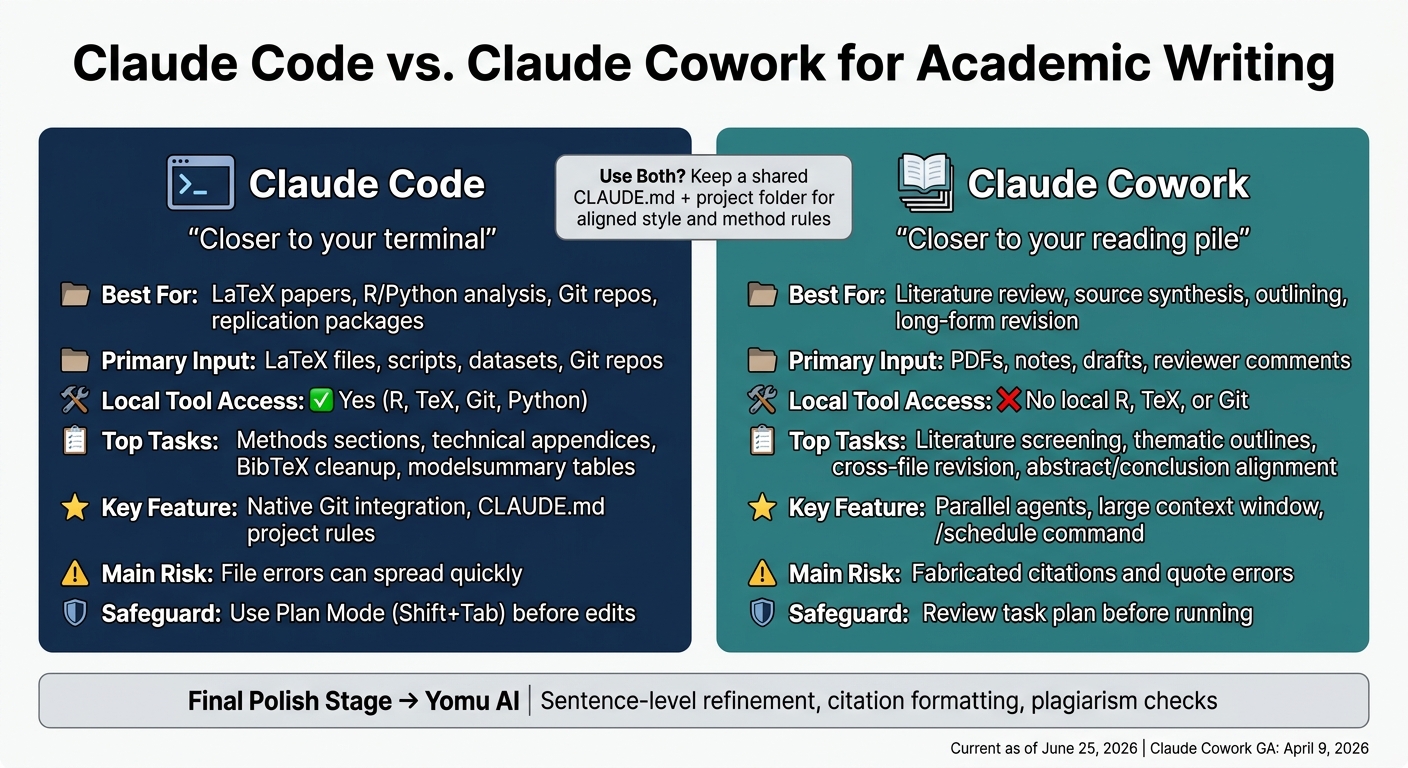
Claude Code vs Claude Cowork: Academic Writing Tool Comparison
Pick Claude Code when the task ends with compiling, building, or pushing changes through Git. Pick Claude Cowork when the job is mostly about reading, sorting ideas, and revising text.
| Feature | Claude Code | Claude Cowork |
|---|---|---|
| Primary academic tasks | LaTeX papers, R/Python analysis, Git, replication packages | Literature screening, file organization, outlining, drafting |
| Code and file support | Full local toolchain: R, TeX, Git, Python | Works in an isolated environment; no access to your local R, TeX, or Git setup |
| Synthesis and drafting | Methods sections, technical appendices | Literature synthesis, thematic narratives |
| Main caution | Requires terminal/CLI comfort | Cannot compile LaTeX or run local R scripts |
At heart, the decision is pretty simple: does your work depend on local files and code execution, or does it lean more on reading, organizing, and revising text?
When Claude Code is the better choice
Claude Code is the better fit for LaTeX papers, R or Python analysis, replication packages, and technical appendices.
If your workflow lives in a terminal, this is usually the safer pick. It works best when you need to run scripts, manage project files, or move from writing straight into compile and Git steps without leaving your setup.
When Claude Cowork is the better choice
Claude Cowork is the better fit for literature screening, turning notes into outlines, and revising long drafts across multiple sessions.
It also helps with repeat admin work that can quietly eat up a week. Its built-in /schedule command can automate recurring tasks, like scanning a folder for new PDFs every Friday and updating a literature log, so routine maintenance does not take over your writing time.
After you’ve handled structure and revision, use Yomu AI for sentence-level cleanup and citation formatting.
Where Yomu AI fits alongside both tools

Yomu AI works best at the final polish stage: sentence-level refinement, paraphrasing, citation formatting, and a last pass for clarity before submission.
Conclusion: Choosing the right setup for academic writing
In practice, this choice comes down to where you are in the workflow. The main call is pretty simple: does your work end with compilation and version control, or with reading, organizing, and revising sources?
If you're running R or Python scripts, building LaTeX manuscripts, or moving through edit-compile-fix cycles, Claude Code is the better match. It plugs right into your local toolchain - TeX distributions, R, Python, and Git - so you can keep the technical side of the project moving without bouncing between tools. If your work leans more toward literature organization, source summaries, outlining, and long-form drafting, Claude Cowork will likely feel like a more natural fit.
For mixed projects, there's no need to draw a hard line. Both tools can use the same project folder and CLAUDE.md file, which helps keep your method and style rules aligned.
After drafting and revision, use Yomu AI for final sentence-level polish, citation formatting, and plagiarism checks.
FAQs
Can I use Claude Code and Claude Cowork on the same paper?
Yes. Because they use the same shared file system, you can use both in a single research workflow.
Claude Code is better for building, versioning, and compilation work. Claude Cowork is a better fit for file management, research organization, and background tasks.
That setup makes it easy to switch between hands-on technical drafting and day-to-day project support.
How should I verify citations and quotes before submitting?
Cross-check every claim, number, and quote against the original source by hand. Don’t let the model make up citations for you.
Use a BibTeX or BibLaTeX file, and tell the system to cite only from that file. You can also add rules in a CLAUDE.md file and use bibliography agents to verify DOIs, flag missing entries, and keep final control over academic integrity.
What research data should I keep out of these tools?
Avoid entering sensitive, private, or restricted research information. And don’t use these tools to access or process paywalled content unless you have authorized institutional access. They may not handle database authentication or access rules in a reliable way.
Also, don’t lean on them to make up data or invent citations that don’t appear in your sources. Check statistical claims, methodology, and sensitive qualitative data by hand.