
Claude Skills for Academic Writing and Research
If you use Claude the right way, it can help you plan, draft, test, and edit academic writing faster - but you still need to verify every source and claim.
I’d sum up the article like this: Claude is most useful for idea development, section drafting, thesis shaping, argument checks, paper summaries, paraphrasing, outlining, literature review synthesis, and full-manuscript revision. The article’s main point is simple: use Claude for the thinking-heavy parts, then use Yomu AI for citations, originality checks, and final cleanup.
Here’s the full takeaway in one glance:
-
Claude works best for:
- drafting one section at a time
- turning rough findings into a thesis
- finding weak logic in an argument
- summarizing journal papers
- paraphrasing dense passages
- building outlines
- grouping studies into lit review themes
- checking whether a full manuscript stays aligned
-
Yomu AI works best for:
- citation formatting
- plagiarism and originality checks
- sentence-level cleanup
- final submission prep
-
Main limits to keep in mind:
- Claude can invent citations
- it can overstate what a source says
- it cannot fetch paywalled papers on its own
- AI use may need disclosure based on school or journal rules
-
Best workflow from the article:
- use Claude to map the paper
- draft in short sections
- ask Claude to review like a skeptical peer
- verify sources yourself
- send the draft to Yomu AI for formatting and polish
A key stat in the piece: a 2025 Nature survey found 67% of academic researchers already use AI tools in their workflow. So the question is no longer whether these tools show up in research writing. It’s how to use them without making citation or accuracy mistakes.
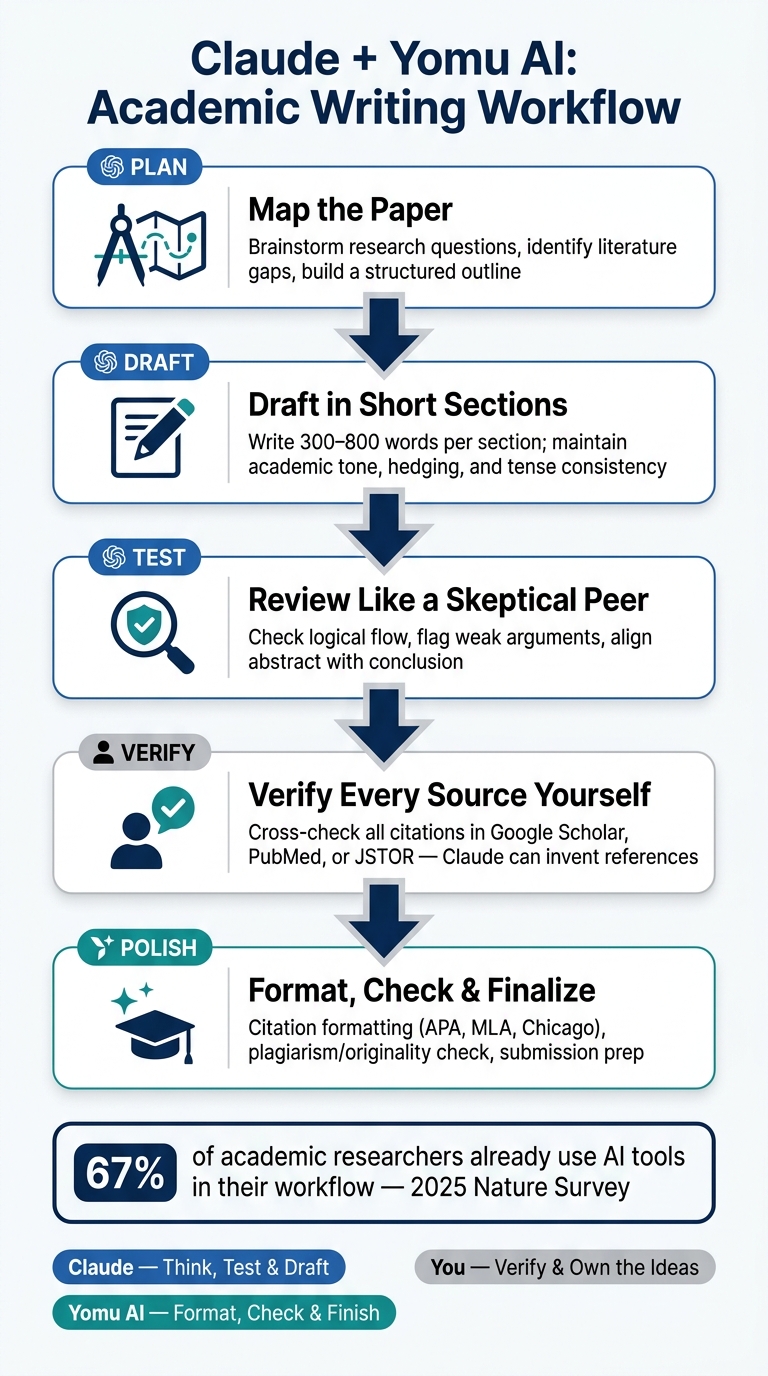
Claude vs Yomu AI: Academic Writing Workflow Step-by-Step
How to Use Claude for Research Writing (My Actual Process)
sbb-itb-1831901
Quick Comparison
| Task | Claude | Yomu AI |
|---|---|---|
| Thesis building | Strong fit | Light cleanup |
| Drafting sections | Strong fit | Supports phrasing |
| Argument checking | Strong fit | Limited role |
| Article summaries | Strong fit | Cleanup/storage |
| Paraphrasing | Strong fit | Style edits |
| Literature review synthesis | Strong fit | Final polish |
| Citation formatting | Check by hand | Main use |
| Originality checks | Not the main use | Main use |
| Final manuscript cleanup | Structure and logic | Submission prep |
Bottom line: I’d use Claude to think, test, and draft, and I’d use Yomu AI to format, check, and finish.
What Makes Claude Useful for Academic Work
Claude’s biggest edge is its large context window. In plain English, that means it can keep track of long papers, notes, and multiple PDFs in the same session. So instead of working with one paragraph at a time, you can work across a full paper without losing the thread.
It’s also good at keeping an academic tone steady. That includes hedging, tense, and formal register. That matters most when you’re writing claims, qualifications, and methods sections, where small shifts in wording can change how your argument lands. The same control over tone and nuance also helps when you’re trying to shape a clear thesis.
Another strength is measured uncertainty. Claude is more likely to say it doesn’t have enough information instead of patching the gap with a confident-sounding fabrication. In academic writing, credibility matters, so that difference matters too.
That said, Claude is still a drafting and thinking tool, not a substitute for close reading or original analysis. It only works with text you paste or upload because it can’t access paywalled sources on its own. It can also invent citations, so check every reference in Google Scholar or your library database before you use it. And before you bring AI into your process, review your institution’s or target journal’s disclosure policy. Here’s how those strengths show up in specific academic tasks.
1. Using Claude with Yomu AI for Academic Drafting
The Primary Academic Task
Claude’s large context window helps most during drafting. It can keep your sources, tone, and claims lined up across multiple sections, which matters a lot when a paper starts getting long and messy.
The Best Claude Prompt Workflow
Use the outline-then-draft method. It keeps the process simple and cuts down on back-and-forth edits.
| Phase | What You Do | What Claude Produces |
|---|---|---|
| Skeleton | Share your research question and key findings; ask for a detailed outline | Structured headings with bullet-point content cues |
| Flesh | Feed specific data or quotes; request 300 to 800 words per section | Academic prose in your specified tense, voice, and register |
| Polish | Ask Claude to act as a critical peer reviewer and flag weak points | A list of logical gaps and suggested fixes |
Before drafting, set a few ground rules: word count, tense, voice, and citation style, such as APA 7th. That gives you steadier output across sections, so you’re not fixing the same tone issue over and over.
What Output to Expect
Draft one section at a time. In most cases, quality starts to slip once you go past about 800 to 1,000 words. Stay inside that range, and Claude tends to do a good job with sentence flow, transitions, hedging language, and tight phrasing.
That section-by-section process also makes it easier to sharpen your thesis and clean up your argument as you go.
How Yomu AI Strengthens the Result
Once Claude finishes a section, move it into Yomu AI for citation cleanup and a final plagiarism check before submission.
2. Developing Strong Thesis Statements
Once you have your findings, Claude can help turn them into a thesis you can defend.
The Primary Academic Task
After you overcome writer's block to draft early notes or a rough outline, the hard part is turning those findings into a clear claim. Claude can help you compare your findings with the existing literature, spot gaps where your paper can add something new, and shape that contribution so it fits the scholarly conversation. In this stage, Claude works best as a thinking partner. It pressures your ideas a bit, checks them against the literature, and helps sharpen the claim.
The Best Claude Prompt Workflow
Start simple. Explain your research in plain, conversational language before you ask for polished academic wording. Say what you studied, what you found, and what you think it means. Then ask: "What's the strongest framing for this paper? What counterarguments should I address?" That can bring out angles you may have missed.
After you have a draft thesis, ask Claude to switch into skeptical reviewer mode. Have it flag the three weakest points in the argument and test the claim against the evidence. This step matters. A thesis shouldn't sound bigger than the proof behind it.
Use hedging so the claim stays arguable instead of overstated. Claude should give you a few tighter thesis options rather than one final sentence, along with likely counterarguments and literature gaps your claim could speak to.
A good thesis doesn’t just state what you found. It shows where your paper fits, what it adds, and where readers might push back.
How Yomu AI Strengthens the Result
Once you've landed on a thesis, use Yomu AI to make sure the claim stays in line with the rest of the paper and to tighten the wording without changing the core argument.
With the thesis set, the next move is checking whether the argument actually holds together.
3. Refining Arguments and Logical Coherence
A thesis can sound solid at first and still fall apart under review. Claude helps pressure-test the argument. Once the thesis is in place, the next step is making sure each section still supports it.
The Primary Academic Task
After you’ve shaped a thesis, the hard part is checking whether the argument behind it actually holds together. Claude can review whether your reasoning moves cleanly from premise to evidence to conclusion, point out contradictions across sections, and spot claims that don’t have enough support. It can also compare your abstract with your conclusion to catch gaps between what the paper promises at the start and what it delivers by the end.
The Best Claude Prompt Workflow
The best way to use Claude here is simple: treat it like a skeptical reader, not a cheerleader.
Paste in one section and ask:
"Review this paragraph for logical flow. Does the argument progress clearly from premise to evidence to conclusion? Identify any gaps in reasoning."
Then move up a level and have Claude review the full draft for weak links, unsupported claims, and section-level gaps in logic.
For consistency across sections, paste the abstract and conclusion together and ask:
"Do these align? Is anything in the abstract not supported by the conclusion, or vice versa?"
That kind of prompt works well because it gives Claude a clear job. You’re not asking for vague feedback. You’re asking it to test the chain of reasoning.
What Claude Flags
Claude will point out weak spots in the argument, gaps in reasoning, and mismatches between sections. It also keeps academic hedging in place, so claims stay tied to the evidence. That matters. A paper can drift off course when a tool rewrites too aggressively.
There’s one catch: Claude can sometimes add details that weren’t in the source text. So if it surfaces a specific claim, check it against your sources before you keep it.
How Yomu AI Strengthens the Result
Once Claude has identified the structural problems, Yomu AI helps with the cleanup. Its AI writing aid tools can tighten paragraphs, smooth transitions, and keep the tone steady without throwing off the argument Claude helped you rebuild.
After the argument is in shape, Claude can also help turn source articles into concise summaries. Using a research paper summarizer ensures you don't miss critical details during the condensation process.
4. Summarizing Journal Articles and Research Papers
Reading dense academic papers eats up time fast, and most researchers don't have much of it to spare. Claude helps by pulling out the research question, methods, key findings, and limitations in a format you can use right away. Those summaries can then become the raw material for literature reviews, outlines, and early draft sections or overcoming writer's block. The goal is simple: turn heavy reading into notes you can work with.
The Primary Academic Task
Claude can pull out methods, results, and limitations from a single paper or compare several studies in one pass. It can handle full manuscripts or a batch of papers in one session without losing track of the thread. That matters because you get a cleaner synthesis, not a string of mini-summaries that slowly drift away from the source.
Its careful wording also helps keep the summary closer to what the paper actually says. From there, you can use the output to build notes, paraphrase later, and line studies up against each other.
A Prompt Workflow That Works Well
One solid approach is to summarize section by section: methods first, then results, then discussion. A prompt that works well:
"Summarize the methodology and results sections of this paper in formal academic language in the third person. Extract any reported p-values, sample sizes, effect sizes, and confidence intervals. Do not invent any citations."
That last line matters more than it may seem. Claude can sometimes produce references that sound real but don't exist, so direct limits like this help cut down on hallucinations. Before you use any citation in your paper, check it against PubMed or Google Scholar.
Main Output You Can Expect
Claude usually gives you structured summaries across the main parts of a paper, including Background, Objectives, Methods, Results, and Conclusion. For literature reviews, it can also build comparison tables that line up research design, sample sizes, and limitations across studies side by side. That makes it much easier to compare papers before you start writing.
It can also point out statistical warning signs, like p-values reported without sample sizes. That's useful when you're trying to judge source quality before leaning on a study in your argument.
How Yomu AI Strengthens the Result
Claude does the extraction and synthesis. Yomu AI then cleans up the wording and formats references, so your notes are in better shape for citation work. Once the summaries are cleaned up, the next step is paraphrasing them without changing the meaning.
5. Paraphrasing Complex Academic Passages
Once you've summarized a source, Claude can help you restate it in a clean way without watering down the argument. Dense academic prose is tough to rework without losing meaning. That gets even harder when you need to keep the nuance of research writing for papers, literature reviews, and draft sections. One thing Claude does well here is preserve academic hedging. It tends to keep phrasing like "the results suggest" instead of turning it into "the results prove", which helps retain the source's caution.
The Primary Academic Task
Paraphrasing means changing the structure and wording while keeping the argument the same. Claude is good at this because it can hold onto a formal academic register, keep the technical terms specialists expect, and preserve the nuance of the source text.
The Best Claude Prompt Workflow
Specific constraints tend to work better than open-ended requests. A prompt like this usually works well:
"Paraphrase this 180-word paragraph in 120 words. Use formal academic language in the third person. Keep all technical terminology. Keep all citations exactly as written and do not add any sources not provided in the text."
After the first pass, ask Claude to act as a skeptical reviewer and flag weak points or logical gaps in the rewrite.
Main Output You Can Expect
Claude will usually return a cleaner version that keeps both the claim and the caution around it. Still, you should always compare the output against the original source to make sure the meaning hasn't been distorted or oversimplified.
How Yomu AI Strengthens the Result
Once Claude has rewritten the passage, Yomu AI's Academic mode with Formal tone can help tighten the phrasing and smooth out the style. From there, those rewritten passages can move straight into your outline and draft.
6. Outlining Essays, Research Papers, and Dissertations
Once your source notes are cleaned up, Claude can turn them into a working outline fast. You can give it a research question, a thesis, or a pile of notes, and it will shape them into a clear structure in seconds. The big win here is that each section stays tied to your argument, instead of drifting into a random list of headings.
The Primary Academic Task
Claude groups ideas by repeated themes and spots research gaps that can support an original contribution. That matters most in dissertations, where chapter order has to carry one sustained argument across a long document.
The Best Claude Prompt Workflow
Start by pasting your organized notes or source abstracts into Claude. Then ask it to find patterns before it builds the outline. A prompt like this works well:
"I'm writing a graduate-level research paper on [topic]. Here are my notes from several sources. Identify the main themes, flag any contradictions, and generate a full outline with section headers, subpoints, and suggested topic sentences."
After Claude gives you the outline, use a second prompt: "Read this outline as a skeptical peer reviewer. Where are the logical gaps or unsupported claims?"
That second pass can catch structural weak spots before you draft even one paragraph. It's a simple move, but it can save a lot of cleanup later.
Main Output You Can Expect
The output is usually a tiered outline you can build from section by section. Claude often includes:
- Section headers
- Subpoints
- Brief notes on what each section needs to argue
For longer documents, it can also create a research roadmap organized into Foundation Papers, Mechanism & Evidence, and Gap Analysis stages. That setup also helps when you need to group and compare sources in a literature review.
How Yomu AI Strengthens the Result
Use AI generator essay tools like Yomu AI's templates for argumentative essays, research papers, and IMRaD documents to turn the outline into a draft with citation support.
7. Organizing and Synthesizing Literature Reviews
After you’ve summarized each paper, Claude can help turn those notes into a literature review that shows how the studies fit together. Instead of leaving you with a pile of separate summaries, it helps shape them into a review built around themes, debates, and methods.
The Primary Academic Task
Claude’s main strength here is thematic synthesis. It can take your notes or abstracts and group them into theme clusters, then show how the debate has shifted over time. That matters because a good literature review isn’t just a stack of mini-summaries. It should show the conversation happening across the field.
Claude can also map where scholars disagree. It can lay out argument structures, point to where different camps split, and bring up blind spots that are easy to miss when you’re reading one paper at a time. That makes it easier to sort out which themes back your argument and which ones point to a gap you can use.
The Best Claude Prompt Workflow
Start with your own notes, not raw source files. Read the papers, write down the key findings and methods, and paste those notes into Claude. This cuts the risk of fabricated sources. Add a plain instruction like: Do not add any sources I haven't provided.
A two-pass workflow tends to work best. First, ask Claude to map the debate: who agrees with whom, where the main disagreements are, and what lines divide the discussion. This nudges it to cluster papers by argument instead of just by shared terms, which is far more useful than a simple topic tree.
Then use that debate map to build the review by theme first, and by disagreement second. After that, follow up with a drafting prompt such as: Draft the literature review section in one paragraph per cluster, then one paragraph per disagreement.
You can also ask Claude for a comparison table that lines up papers by research design, sample size, and key findings. That table is helpful for spotting patterns, but it shouldn’t replace the written narrative.
Main Output You Can Expect
Claude can give you a thematic narrative draft, an argument map showing which scholars line up and which ones conflict, and a comparison table for methods and findings. It can also point out research gaps and open questions that your literature review may want to highlight.
How Yomu AI Strengthens the Result
Once Claude has done the synthesis, Yomu AI can take over the citation tool essentials and final polish.
8. Structuring, Editing, and Polishing Full Manuscripts
Once the draft is done, Claude can check whether the full manuscript still works as one argument. Its context window goes up to 200,000 tokens, so it can follow an entire manuscript in one pass. This is the stage where you test the draft from beginning to end and see if the whole thing still holds together.
The Primary Academic Task
The main revision issue is often section-to-section misalignment. The abstract, introduction, and conclusion can slowly drift away from each other. Claude can compare those sections directly and point out where they no longer match.
It can also take on the role of a skeptical reviewer. That’s useful when you want pressure-testing, not praise. Ask it to read your manuscript that way and identify the three weakest points in your argument.
The Best Claude Prompt Workflow
For the best results, review and edit in chunks of 800–1,000 words instead of pasting the full manuscript at once. That tends to make the feedback easier to act on.
A few prompts that work well:
- "Review this section for logical flow. Does the argument progress clearly? Identify any gaps in reasoning."
- "Reduce this 180-word paragraph to 120 words without losing key information."
- "Identify abrupt transitions between sections and suggest bridge sentences."
For a consistency check, paste your abstract and conclusion side by side and ask: "Do these align? Is anything in the abstract not supported by the conclusion, or vice versa?"
Main Output You Can Expect
After this pass, Claude should give you:
- a list of section-alignment issues
- suggested bridge sentences between paragraphs
- tighter prose with a lower word count
- a mock peer review that points to the weakest parts of the argument
How Yomu AI Strengthens the Result
Once Claude has fixed structure and flow, move the manuscript into Yomu AI for line edits, citation formatting, and originality checks. Claude handles the big-picture argument. Yomu AI handles the final cleanup.
How to Use Claude and Yomu AI Together in One Research Workflow
Use Claude for thinking and outlining. Use Yomu AI for drafting, polishing, and formatting.
After you've built your thesis, tested your argument, and pulled your sources into a clear line of thought, use this two-step handoff to move from planning to drafting.
- Claude for the thinking phase: Use Claude to brainstorm thesis options, test objections, pull patterns from your notes, and build an outline. Add: "Do not add any sources I haven't provided."
- Yomu AI for the drafting phase: Move the outline into Yomu AI to draft the paper section by section, tighten phrasing, and format citations.
Once Claude has cleared up the argument, switch tools for drafting and final cleanup. That split helps keep Claude on analysis and Yomu AI on final assembly.
Use this sequence to avoid blending analysis, drafting, and final formatting in the same pass:
| Workflow Stage | Tool | Primary Task |
|---|---|---|
| Discovery | Claude | Brainstorming research questions and identifying literature gaps |
| Synthesis | Claude | Grouping sources by theme and creating a thematic narrative |
| Argument Testing | Claude | Acting as a skeptical reviewer to find weak points |
| Outlining | Claude | Structuring the paper into logical sections |
| Drafting & Phrasing | Yomu AI | Building the paper and improving sentence-level clarity |
| Final Polish | Yomu AI | Citation formatting and plagiarism checks (APA, MLA, Chicago) |
Check every citation before submission.
Workflow Comparison Table
This table gives you a fast way to see where each part of the workflow fits. If you're trying to decide when to use Claude and when to lean on Yomu AI, this makes the split pretty clear.
| Academic Task | Claude's Role | Typical Output | Yomu AI's Role |
|---|---|---|---|
| Thesis Development | Generate thesis angles and test the claim | 3–4 research framings with a gap analysis | Refining the thesis for academic tone and precision |
| Article Summarization | Extract methods, sample sizes, and findings | Two-sentence methodology summaries across 20+ papers | Saving summaries in a searchable source library |
| Lit Review Synthesis | Group studies by emergent themes | Thematic narrative draft with source markers and methodology comparisons | Managing transitions between themes |
| Outlining | Map logical flow and structure paper sections | Multi-level outline for a dissertation or journal article | Setting up document structure and heading hierarchy |
| Drafting | Translate notes into formal academic prose | 300-word paragraph with hedging language preserved | Drafting support during composition |
| Manuscript Polishing | Check transitions and align abstract, results, and conclusions | Discussion section with three logical gaps flagged for revision | Running academic plagiarism checks and finalizing citation formatting |
Next, we’ll look at the accuracy, citation, and academic integrity checks that help keep this workflow dependable.
Best Practices for Accuracy, Citation, and Academic Integrity
Once the draft is revised, accuracy is the last gate. Claude can make up references, so don’t treat any citation as safe by default. A simple way to handle this is to use author-year placeholders first, then verify each source in Google Scholar, PubMed, or JSTOR before you submit anything.
There’s another issue that can slip past you: Claude may quietly make an author’s claim sound stronger or narrower than it was in the original text. That’s why every summary and paraphrase needs a source check, especially when the passage includes statistical findings, effect sizes, or p-values.
Before finalizing the manuscript, do one more pass for voice. Strip out generic AI phrasing and put back your own sentence habits. That small edit can make the paper fit your field’s norms and sound more like you, not a template. After that, move to the last round of citation and disclosure checks.
Use Yomu AI for citation formatting and originality checks. Also follow your institution’s AI policy, and disclose Claude use when required, including the model name and the steps you took to verify the draft.
Conclusion
Claude can help with thesis building, argument refinement, summarizing, paraphrasing, outlining, literature review synthesis, and manuscript polishing. But the main payoff comes when you use those skills together, not one by one.
It works best when Claude handles structure, phrasing, and word economy while you stay in charge of the ideas. That’s why it tends to shine most during early thinking and revision, when the shape of the paper is still taking form and the wording still needs work.
A simple way to split the job is this: Claude helps with thinking and drafting, while Yomu AI takes care of formatting, citation cleanup, and the final polish. Used that way, the pair can speed up drafting without lowering academic standards.
Use Claude to think and draft. Use Yomu AI to verify, format, and finalize. That workflow helps turn rough notes into a submission-ready paper.
FAQs
How can I verify Claude’s citations and claims?
Treat Claude like a research assistant, not the final word. It can hallucinate, so check every citation and factual claim against your source files.
- Cross-check citations, quotes, and stats with the original documents.
- Tell Claude to use only the sources you give it.
- Use citation tracking, DOI resolution, and citation format validation tools.
When should I use Claude instead of Yomu AI?
Use Claude when you need a flexible writing partner for nuanced academic work. It’s a good fit for testing hypotheses, refining tone, pulling together material you already have, drafting sections, and improving structure.
Where it helps most is process and synthesis. In plain English, it can help you think through an argument, tighten your wording, and turn a rough draft into something more polished.
But it’s not the right tool for primary source discovery or automatic citations. Claude doesn’t have live access to academic databases, and it can hallucinate citations. So if you need source finding or citation accuracy, you’ll still want to check databases and verify every reference yourself.
Do I need to disclose AI use in academic writing?
Yes. You should clearly disclose any AI help used in your academic writing to protect academic integrity and give proper credit.
Be specific about which parts involved AI support. For example, note whether AI helped with brainstorming, outlining, editing, summarizing, or drafting. Then check all AI-written text against your original sources.
At the end of the day, you are responsible for every claim, citation, and quote in your final paper.