
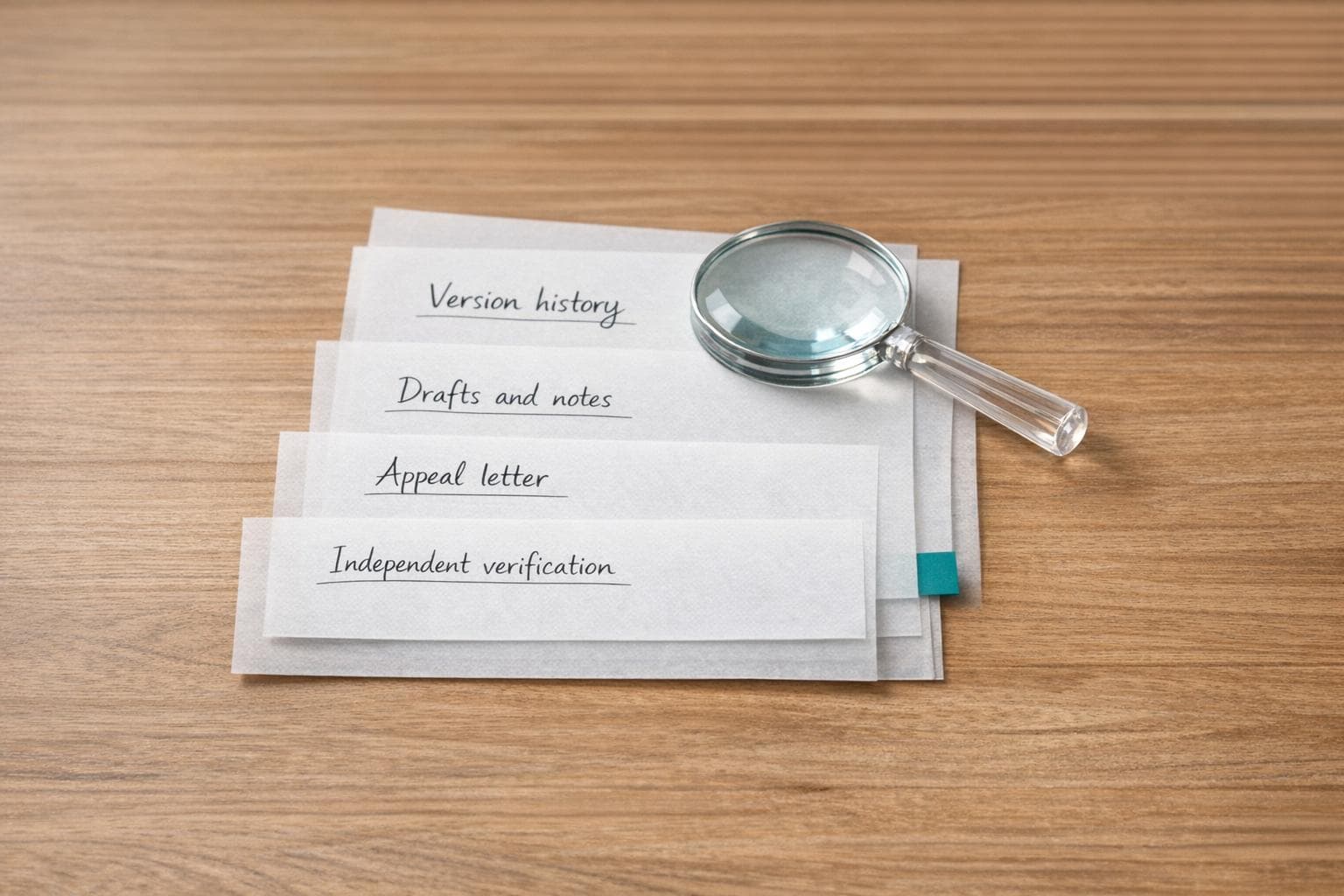
False Positive on Turnitin AI Detection: Step-by-Step Appeal Checklist
Turnitin's AI detection tool isn't perfect. It can mistakenly flag human-written content as AI-generated, causing unnecessary stress and academic consequences. If your work has been wrongly flagged, here's how you can address it effectively:
- Understand the Issue: False positives often occur due to structured writing styles, repetitive language, or tools like Grammarly.
- Gather Evidence: Use tools like Google Docs' "Version History" or Microsoft Word's "Track Changes" to show your writing process. Collect drafts, notes, and prior work as proof.
- Write a Strong Appeal: Present your evidence clearly, request a review, and maintain a professional tone.
- Use Additional Tools: Verify your originality with academic plagiarism checker tools like Yomu AI to strengthen your case.
- Act Quickly: Reach out to your instructor or academic office within 24–48 hours to start the appeal process.
Turnitin itself acknowledges its tool isn't foolproof. By following these steps, you can confidently challenge false positives and protect your academic record.
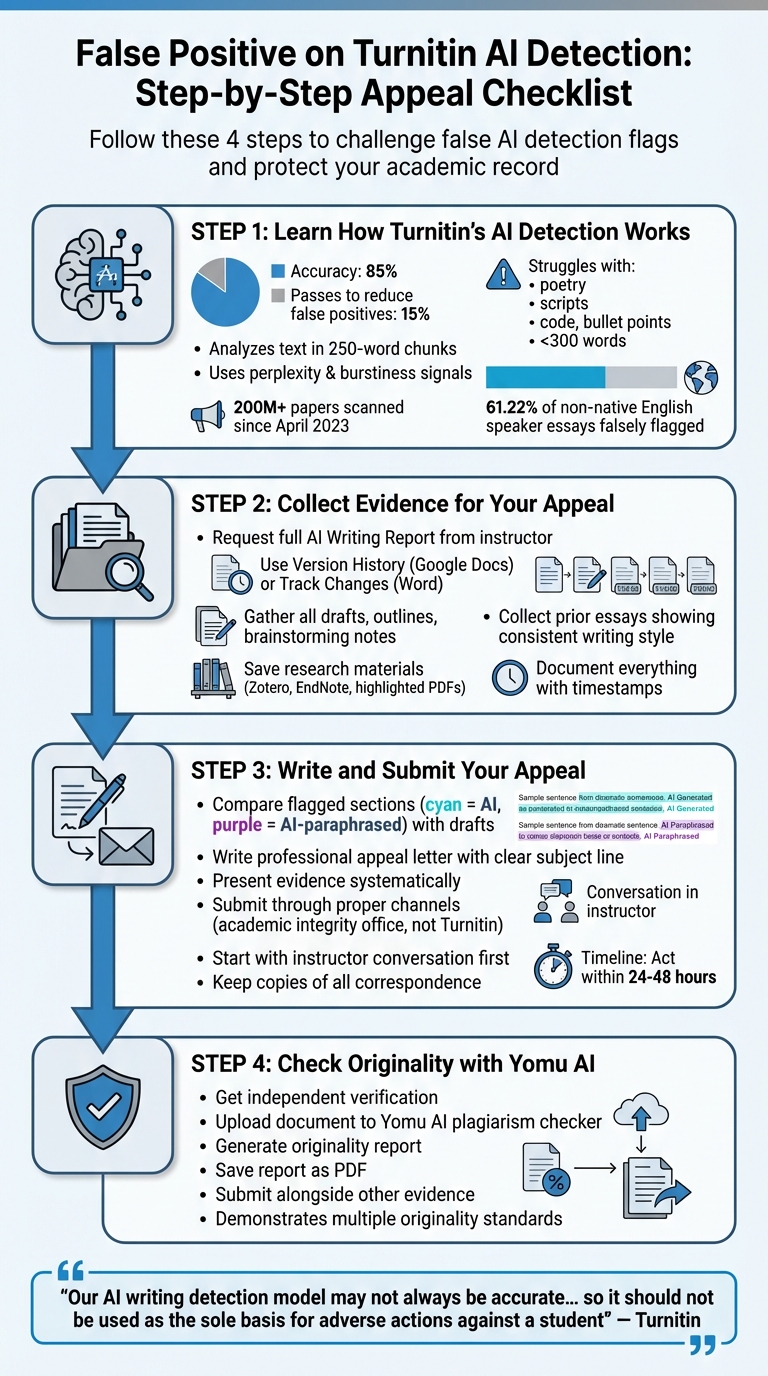
4-Step Process to Appeal Turnitin AI Detection False Positives
Step 1: Learn How Turnitin's AI Detection Works
How Turnitin's Algorithm Works and Its Weaknesses
Turnitin uses transformer-based classification models (AIW-1, AIW-2, and AIR-1) trained on millions of samples of both human- and AI-generated text. The system breaks your document into chunks of about 250 words and analyzes each segment individually to estimate the likelihood that it was written by AI.
The algorithm relies on two primary signals: perplexity and burstiness. Perplexity measures how predictable the text is - AI tends to use safer, statistically common words, while human writing often includes more context-specific or unexpected word choices. Burstiness, on the other hand, looks at variation in sentence structure and length. Human writing naturally varies, while AI tends to produce text with a more uniform rhythm.
Interestingly, Turnitin's Chief Product Officer revealed that the system's detection rate is about 85%. This means 15% of AI-generated content is intentionally allowed to pass to reduce false positives. Since its launch in April 2023, Turnitin has scanned over 200 million papers. However, it’s important to note that the detector works best with long-form prose and struggles with certain formats like poetry, scripts, code, tables, bullet points, or annotated bibliographies. For submissions under 300–500 words, the system’s accuracy drops significantly because there isn’t enough data to establish clear patterns.
"The model does not reliably detect AI-generated text in the form of non-prose, such as poetry, scripts, or code, nor does it detect short-form/unconventional writing such as bullet points, tables, or annotated bibliographies."
- Turnitin
The system also has trouble with highly structured writing. For example, lab reports, mathematical proofs, legal documents, and business memos often contain boilerplate language that mimics AI-generated text. In 2025, a software patch mistakenly flagged STEM-related mathematical proofs due to a technical issue.
These limitations highlight the patterns and scenarios where false flags are more likely to occur.
Common Patterns That Trigger AI Detection
Certain textual patterns tend to raise red flags, even in authentic human writing. Repetitive transitions and uniform sentence structures often signal low burstiness, which is a common characteristic of AI-generated text. Similarly, predictable word choices can result in low perplexity scores, another indicator the system uses.
Formal academic writing is especially at risk. Tools like Grammarly can introduce consistent phrasing, which aligns with patterns Turnitin flags as AI. For instance, frequent use of transitions such as "Furthermore", "Moreover", and "Additionally" can make the text appear overly uniform.
Non-native English speakers face additional challenges. A Stanford study found that AI detectors falsely flagged 61.22% of TOEFL essays written by non-native English speakers. Simplified vocabulary and formulaic sentence structures, often used for clarity, can mimic AI-generated patterns. Similarly, students with ADHD, autism, or dyslexia may rely on repeated phrases or specific structural patterns, increasing their chances of being flagged.
If your report shows an asterisk (*) instead of a percentage, it means the score falls between 1% and 19%. This range is considered less reliable and more prone to false positives. Additionally, 54% of false-positive sentences are located next to actual AI-generated content, suggesting that the algorithm sometimes misidentifies transition areas.
University wrongly accuses students of using AI to cheat | ABC NEWS
Step 2: Collect Evidence for Your Appeal
Now that you’ve familiarized yourself with Turnitin’s AI detection process in Step 1, it’s time to gather solid proof to back up your appeal.
Get the Complete AI Detection Report
Start by requesting the full AI Writing Report from your instructor. This report includes key details like the overall percentage score, the interactive submission breakdown, and the "AI Writing" tab, which highlights the flagged sections. If your student portal only provides a partial view, ask your instructor for the full report, as access can sometimes be limited by institutional settings.
Once you have the report, verify its metadata by checking the "i" icon to confirm its origin. The downloaded file will come with a cover sheet, your AI score, and your document with color-coded sections. Here’s how to interpret the highlights:
- Cyan: Text flagged as AI-generated.
- Purple: Text flagged as AI-generated but modified with a paraphrasing tool.
If the score is marked with an asterisk (*%), it means the detection score falls below the threshold for reliability. After downloading and verifying the report, you can move on to documenting your writing process.
Gather Proof of Your Original Work
To prove your authorship, create a clear record of how your work was developed. Use tools like Google Docs' "Version History" or Microsoft Word's "Track Changes" to provide a timestamped log of every edit, addition, and deletion. This timeline is crucial for showing that your work was created step by step, not all at once.
Compile all drafts, outlines, brainstorming notes, and research materials. Clearly label these files to reflect the progression of your writing process. If you used tools like Zotero or EndNote for your research, save your highlighted PDFs, bibliographies, and notes as further evidence of your independent work. For handwritten notes or physical outlines, take photos and include them as part of your documentation.
"Documentation is your best defense."
- Chloe Bouchard
Lastly, gather samples of your prior essays or assignments. These can help establish that your writing style and voice in the flagged assignment match your usual patterns, reinforcing your claim of originality.
Step 3: Write and Submit Your Appeal
Now that you've organized your evidence from Step 2, it's time to build a strong case to prove your original authorship.
Compare Flagged Sections with Your Drafts
Start by opening the AI Writing Report and carefully reviewing the highlighted sections. Cyan highlights indicate text flagged as AI-generated, while purple highlights signify content marked as AI-paraphrased. To make your case, place your earliest draft side-by-side with the flagged sections to show how your work evolved over time.
Use the version history documentation from Step 2 to provide timestamped proof of your edits. Check the metadata under the "i" icon to confirm your consistent authorship. If there are discrepancies - like differences in spelling conventions (e.g., American spelling in your drafts versus flagged sections) - this can strengthen your argument that the flagged content is a false positive.
Once you've gathered these comparisons, you're ready to draft a concise and evidence-backed appeal.
Write a Clear and Professional Appeal Letter
Your next step is to compile your findings into a formal appeal letter. Start with a clear subject line, such as: "Appeal of AI Detection Flag – [Your Name] – [Course Number]". Keep your tone professional and focused. Begin by acknowledging the AI report and then systematically present your evidence. Include details about your writing process, such as how you conducted research, why you chose specific language, and how your work developed from brainstorming to the final draft.
Turnitin itself acknowledges:
"Our AI writing detection model may not always be accurate... so it should not be used as the sole basis for adverse actions against a student".
Attach all relevant documents, including version history logs, research notes, and earlier drafts, to support your case. Request a human review to ensure your work is fairly assessed.
Submit Through Proper Channels
When submitting your appeal, use the proper channels established by your institution. Typically, this involves going through your academic integrity office, Student Affairs, or Faculty Cases Team rather than contacting Turnitin directly. Start with an informal conversation with your instructor to discuss the AI report before escalating the matter.
Here’s how to proceed:
- Submit a formal complaint following the guidelines in your student handbook.
- Keep copies of all correspondence, including emails and submission confirmations.
- Politely follow up if you don’t receive a response within a reasonable timeframe.
- Seek advice from a student ombudsperson or academic advisor early in the process.
Throughout, maintain a professional demeanor. Avoid defensive or overly emotional language, as this could undermine your credibility. Focus on presenting your evidence clearly and confidently.
sbb-itb-1831901
Step 4: Check Originality with Yomu AI
After submitting your appeal, take an extra step to strengthen your case using an independent verification tool. This step adds another layer of evidence to confirm that your work is your own. By combining this with the materials you've already gathered, you can build a more convincing argument for your originality.
How Yomu AI Supports Your Appeal
Yomu AI's plagiarism checker provides an independent review of your document's originality, offering a second perspective. Since Turnitin itself acknowledges the possibility of misclassifications, having verification from an additional source bolsters your case. Yomu AI scans your document for academic integrity and highlights any formulaic patterns that might mistakenly trigger false positives.
This is especially helpful because Turnitin's detection system focuses on "qualifying text" (long-form prose) and categorizes flagged content into two types: AI-generated only (marked in cyan) and AI-paraphrased (marked in purple). By running your work through Yomu AI, you can demonstrate that your writing meets multiple originality standards, reducing reliance on a single detection method.
Steps to Use Yomu AI for Verification
To verify your work, upload your document to Yomu AI's checker and generate an originality report. If the report confirms your work is original, save it as a PDF to include with your evidence.
When presenting this to your instructor or academic integrity office, explain that you sought an independent review to validate your authorship. Submit the Yomu AI report along with your draft history and research notes. This comprehensive approach shows you've gone above and beyond to prove your work is authentic, making it harder for others to dismiss your appeal based solely on Turnitin's automated results.
How to Prevent Future False Positives
Once you've successfully appealed a false positive, it's time to focus on strategies to avoid similar problems down the line. By adopting proactive writing habits and maintaining thorough documentation, you can reduce the chances of being flagged again. Turnitin's research shows that false positives are more likely when the AI percentage falls between 0% and 19%. Staying out of this "gray zone" is key to ensuring your work is recognized as your own.
Develop a Personal Writing Style
One of the best ways to avoid false positives is by crafting a writing style that showcases your unique perspective and critical thinking skills. Prioritize originality over rigid, formulaic approaches. Steer clear of AI paraphrasing tools altogether - Turnitin now identifies text altered by "word spinners" and flags it as "AI-generated text that was AI-paraphrased".
When appropriate, consider incorporating alternative text formats like tables or bullet points. Turnitin has noted that its detection model struggles with non-prose formats, such as poetry, scripts, or code, as well as short-form writing like annotated bibliographies or lists. Using these formats strategically can help you sidestep unnecessary scrutiny.
Document Your Writing Process
Keeping detailed, timestamped records of your work is another effective way to demonstrate authorship. Use tools with version history or save drafts manually (e.g., Draft_V1, Draft_V2, etc.) to show how your ideas evolved over time. This provides a clear trail of your work's progression, making it harder for anyone to question its authenticity.
Patti West-Smith, Senior Director of Customer Engagement at Turnitin, emphasizes the importance of this: "When instructors can see brainstorming, drafting, revisions, and even the incorporation of feedback from a peer, tutor, or other trusted source, it shows thinking coming to life". Save your research notes, citation lists, and any feedback you receive from peers or writing centers - these elements are strong evidence of human effort, something AI can't replicate.
Use Yomu AI Wisely
While building good habits is essential, smart use of tools like Yomu AI can further strengthen your work's integrity. Yomu AI's citation tool ensures your references are formatted correctly without triggering detection, as Turnitin's model focuses on prose rather than citation styles. Its text refinement features are most effective when applied to drafts you've already written, rather than generating new content.
Be selective about the tools you use. Since Turnitin flags AI-paraphrased text, rely on Yomu AI's summarization feature for understanding sources, not rewriting your content. Additionally, its citation tool can help confirm that your references are accurate and complete, giving you peace of mind about meeting academic standards. Keep in mind that Turnitin requires at least 300 words of prose to generate an AI detection report. While shorter assignments may carry less risk, sticking to these practices across all your work ensures consistent protection against potential issues.
Conclusion: Handle False Positives with Confidence
Dealing with a false positive on Turnitin can feel overwhelming, but it’s entirely manageable with a clear and professional approach. Even Turnitin acknowledges the limitations of its AI detector, stating: "Our AI writing detection model may not always be accurate... so it should not be used as the sole basis for adverse actions against a student". This means you’re well within your rights to challenge any questionable results.
One key step is to document your process thoroughly. Keep a record of draft histories to confirm your authorship. For example, a student successfully overturned a 98% AI detection flag by presenting multiple draft revisions. This kind of evidence not only demonstrates originality but also provides a solid foundation for a calm, fact-based appeal.
When appealing, stay composed and professional. This ensures your credibility remains intact and keeps the conversation focused on the facts. Patti West-Smith from Turnitin underscores the importance of this approach:
"If the evidence isn't clear after the review, give the student the benefit of the doubt. Educators will have had all the right conversations, asked the right questions, and if they're still not sure - students must not be penalized".
Tools like Yomu AI can also bolster your case. By verifying proper citation formatting and refining your text, you can ensure your work maintains academic integrity without triggering unnecessary detection.
Finally, act swiftly. Reach out to your instructor within 24 to 48 hours of receiving the flag. Request a meeting to present your evidence, and if needed, seek additional support from a student advisor or ombudsperson. By following these steps, you’ll be well-prepared to address false positives and safeguard your academic record.
FAQs
What evidence is most convincing to prove I wrote my paper?
To build a strong case for your authorship, it's crucial to present clear and detailed evidence. Start by providing your original draft, along with any revision logs that document changes over time. Including side-by-side comparisons can further prove there’s no plagiarism or AI-generated content involved.
Additionally, supporting materials like notes, early outlines, or older versions of your work can be incredibly helpful. These documents highlight your creative process and reinforce the originality of your submission. Together, this evidence can make your appeal much stronger.
What should I do if my instructor won’t share the full AI Writing Report?
If your instructor isn’t providing the full AI Writing Report, ask for access to review the flagged sections yourself. To support your case, collect evidence such as previous writing samples, drafts, or research notes that demonstrate your original work. Check your writing for potential false positives, like commonly used phrases or properly cited sources, and be prepared to explain your approach. Review your institution’s appeal policies or consult with advisors to build a stronger argument.
Can Grammarly or other editing tools cause a false AI flag?
Grammarly and similar tools, while helpful, can occasionally lead to false AI detection flags on Turnitin. This is especially true if you frequently use features like Rephrase or Rewrite. To minimize this risk, focus on writing in your own words and keeping your style natural. Rely on these tools sparingly, using them as a supplement rather than a crutch, to avoid any unintended detection problems.