
What Does MLA Stand For? MLA Format Explained for First-Year Students
MLA stands for the Modern Language Association, and MLA format is the style many first-year humanities classes use for papers and source citations.
If I had to sum up the whole article in a few lines, it would be this:
- I set my paper to 1-inch margins, 12-point font, and double spacing
- I add a first-page heading and a last name + page number header
- I use in-text citations like (Smith 24)
- I finish with a Works Cited page on a new page
- I make sure every citation matches one source entry
That’s the core of MLA. And it covers the parts students miss most often.
A few facts matter here: MLA is used most often in fields like English, literature, philosophy, language study, and art history. A standard MLA paper uses 8.5 x 11-inch pages, 0.5-inch paragraph indents, and double spacing throughout 100% of the paper, including the Works Cited page.
Quick snapshot:
- What MLA means: Modern Language Association
- Where it’s used: First-year writing and many humanities courses
- How citations work: Author + page number for print sources
- What happens with websites: Often just the author name, since many pages have 0 page numbers
- What to check before submitting: title, header, spacing, and citation match
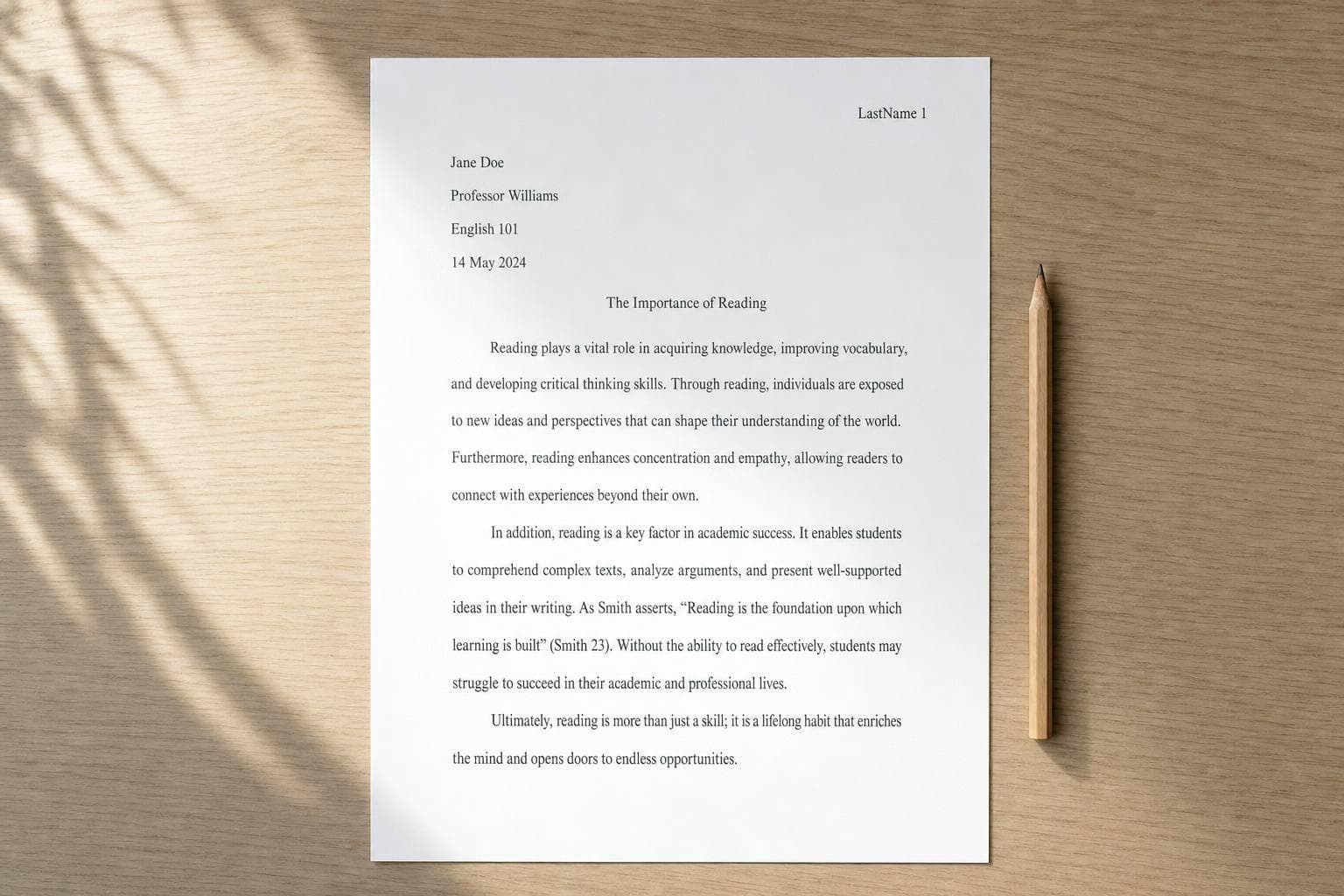
One part students mix up a lot is this: the heading goes on page one, while the header goes in the top-right corner on every page. Another common issue is the date. In U.S. style, I’d write July 25, 2026.
So if you want the short answer, here it is: MLA is a paper format and citation system that helps you organize your essay and show where your source material came from. The rest of the article walks through page setup, in-text citations, and the Works Cited page in plain steps.
How to format your essays using MLA 9th edition
How to Set Up an MLA Paper Step by Step
MLA Format Setup: Step-by-Step Visual Guide
Setting up your paper before you start writing can save a lot of cleanup later. The good news? MLA format is pretty simple once you know where each part goes.
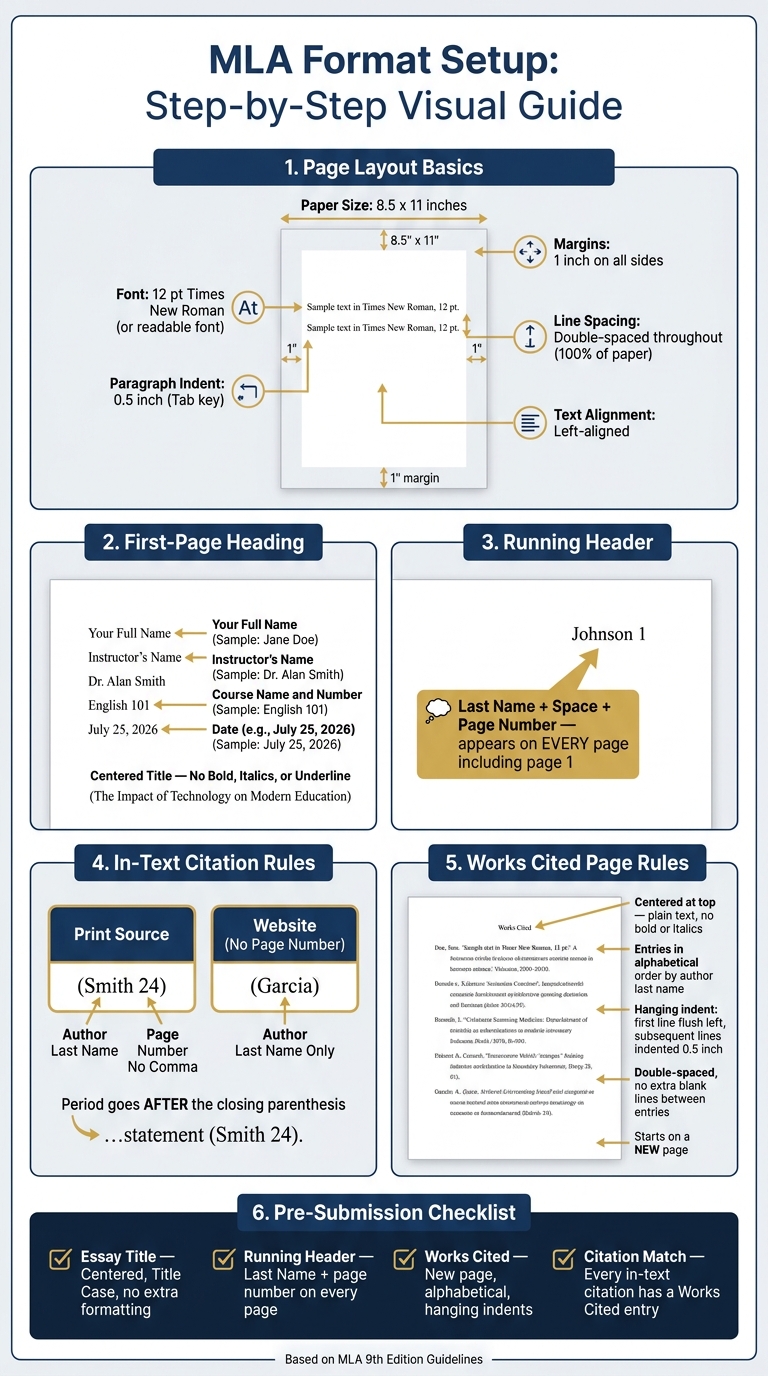
Standard Page Formatting Rules
Start with the basic layout first:
| Element | Requirement |
|---|---|
| Paper Size | 8.5 x 11 inches (standard U.S. letter) |
| Margins | 1 inch on all sides |
| Font | 12 pt, readable font such as Times New Roman |
| Line Spacing | Double-spaced throughout, including the heading and Works Cited page |
| Paragraph Indent | 0.5 inch (use the Tab key, not the spacebar) |
| Text Alignment | Left-aligned |
These rules apply to a standard MLA essay. You usually do not need a separate cover page unless your instructor asks for one.
First-Page Heading and Title Setup
In the upper-left corner of the first page, type these four lines, each on its own double-spaced line:
- Your full name
- Your instructor's name
- The course name and number
- The date
For the date, use U.S. format: July 25, 2026. MLA also allows 25 July 2026. Just stick with one format the whole way through.
Place the title on the next line and center it. Use standard title capitalization. Don’t bold, underline, or italicize it unless the title includes the name of another work.
Adding the Last Name and Page Number Header
Every page, including page one, needs a running head in the top-right header. It should include your last name, a space, and the page number. For example: Johnson 1.
The easiest way to do this is with the Header tool in Word or Google Docs. Add the page number first, then type your last name and a space to the left of it so it repeats on every page.
If your professor gives different directions, follow those instead of standard MLA.
With the page set up, the next step is citing sources in the text.
How to Cite Sources in the Text
After you set up the page, the next MLA step is citing sources in the text. Each time you quote or paraphrase a source in your essay, MLA asks for a brief in-text citation right after it. These short citations point readers to the full source in Works Cited.
Author and Page Number for Print Sources
The standard format is the author's last name and the page number in parentheses before the period. For example: (Smith 24). There's no comma between the name and the page number.
If you already mention the author's name in the sentence, don't repeat it in parentheses. Just add the page number: Smith argues that the policy failed (24). In both cases, the period goes after the closing parenthesis, not before it.
Website Sources with No Page Number
Most websites don't include page numbers, so you leave the number out. The citation is just the author's last name: (Garcia). If the site gives paragraph numbers, you can use them - for example, (Garcia, para. 4) - but only when the source lists them.
If no author appears, use a shortened version of the title instead. For an article, put the title in quotation marks: ("Impact of Digital Media"). For an entire website or book, italicize it: (Lighthouse). When you shorten a title, use the first few meaningful words and drop opening articles like "A", "An", or "The."
In-Text Citations vs. Works Cited Entries: A Side-by-Side View
The key is to use the same author name or title word in both places. That gives your reader a clear path from the brief citation in the essay to the full source details at the end of the paper.
| Feature | In-Text Citation | Works Cited Entry |
|---|---|---|
| Purpose | Shows the source and page number | Provides full publication details so the reader can locate the original source |
| Location | Immediately after the borrowed quote or paraphrase, in the essay body | On a separate Works Cited page at the very end of the paper |
| Core Content | Author and page number, e.g., (Smith 24) | Full source details: author, title, publisher, date, and URL/DOI/page range |
| The Connection | Shared first word for lookup | Alphabetized by that same author name or title keyword |
These short citations connect straight to the full entries in Works Cited.
sbb-itb-1831901
How to Build the Works Cited Page
After your in-text citations, end the paper with a Works Cited page. This page includes every source you used in your essay. Start it on a new page at the end of the paper, with 1-inch margins on all sides. Center the words Works Cited at the top in plain text - no bold, no italics, and no quotation marks. Your running header should stay in the top-right corner with your last name and page number, picking up where the body pages left off.
Once the page is in place, each entry should follow the same format.
Works Cited Page Formatting Rules
The full page should be double-spaced, with no extra blank lines between the title and the first entry or between entries. List entries in alphabetical order by the author’s last name. If a source doesn’t list an author, alphabetize it by the first main word in the title. Skip words like “A,” “An,” and “The.”
Each entry should use a hanging indent. That means the first line sits flush with the left margin, and each line after that is indented 0.5 inches.
If you’re using Microsoft Word, highlight the list, right-click, open Paragraph, and under Indentation > Special, choose Hanging at 0.5 inches. In Google Docs, go to Format > Align and indent > Indentation options and select Hanging at 0.5 inches.
How to Cite a Book and a Website
Use these models as a guide when building your own entries.
A book entry includes the author’s last name, first name, the italicized title, the publisher, and the year:
Morrison, Toni. The Bluest Eye. Vintage International, 2007.
A website entry includes the article title, website name, publisher, date, and URL. Leave out https://:
Coates, Ta-Nehisi. "The Case for Reparations." The Atlantic, Jun. 2014, www.theatlantic.com/magazine/archive/2014/06/the-case-for-reparations/361631/.
If the website doesn’t have a publication date, add an Accessed date at the end, such as Accessed 25 July 2026. If there’s no author, begin with the title instead.
Book vs. Website Citation: A Side-by-Side Table
The table below shows the main differences between book and website entries.
| Element | Book (Print) | Website / Web Page |
|---|---|---|
| Author | Last Name, First Name. | Last Name, First Name (if available). |
| Source Title | Title of Book (Italicized) | "Title of Page or Article" (In Quotation Marks) |
| Container | N/A (self-contained) | Title of Website (Italicized) |
| Publisher | Publisher Name | Sponsoring organization (omit if same as site name) |
| Date | Year of publication | Day Month Year (as available) |
| Location | N/A | URL (omit https://) |
Common MLA Mistakes and a Final Submission Checklist
Common MLA Formatting Errors to Avoid
Once the paper is formatted and the citations are in place, do one last pass. This is where you catch the small stuff that can cost easy points.
The mistakes that show up most often are pretty simple: mixing up the header and the heading, adding extra styling to the title, and messing up double spacing or hanging indents. It also helps to check the date in the heading. In MLA, the format is July 25, 2026.
What to Check Before You Submit
Use this checklist before you submit:
| Element | What to Verify |
|---|---|
| Essay Title | Centered, Title Case, no bold, italics, or quotation marks |
| Running Header | Last Name + page number appears on every page |
| Works Cited | Starts on a new page, alphabetical order, hanging indents |
| Citation Match | Every in-text citation has a matching Works Cited entry |
Match each in-text citation to one Works Cited entry. If you use a source in the essay but leave it off the Works Cited page, that can turn into an academic integrity issue.
Conclusion: The MLA Basics to Remember
If your page setup, citations, and Works Cited page match these rules, your MLA paper is ready. MLA is pretty simple: format the page the right way, cite sources in the text, and end with a complete Works Cited page.
FAQs
When do I use MLA format?
Use MLA format for academic writing in the humanities, such as English, literature, philosophy, religion, ethics, and the arts. It’s commonly required for final drafts of essays, research papers, reports, and similar assignments.
That said, class rules can vary by professor. Check your syllabus or ask your instructor if you’re not sure. If their guidelines differ, follow your instructor’s instructions.
Do I need a cover page in MLA?
No. MLA format does not require a cover page.
Instead, start your essay on the first page of the document. On the left side, include your name, your instructor's name, the class title, and the date.
What if a source has no author?
If a source has no author, leave that part out and begin the Works Cited entry with the title instead. Then alphabetize the entry by title, while ignoring opening articles like A, An, or The.
For the in-text citation, use the title in place of the author’s name. If the title is long, you can shorten it. Italicize book titles, and put article or webpage titles in quotation marks.