

Research Paper Outline Generators: How to Build a Strong First Draft
Starting your research paper doesn’t have to feel overwhelming. Research paper outline generators, like Yomu AI, simplify the process by providing a structured framework tailored to your topic and formatting needs. These tools help you organize your ideas into clear sections - such as Introduction, Literature Review, and Conclusion - saving time and reducing the stress of starting from scratch.
Key Takeaways:
- What they do: Outline generators create a roadmap for your paper, ensuring logical flow and alignment with formats like APA, MLA, and Chicago.
- Why they matter: Papers with structured outlines are completed faster and are more likely to earn higher grades.
- How Yomu AI helps: It automates outline creation, formats citations, and checks for plagiarism in academic papers, all in one platform.
With tools like Yomu AI, you can focus on developing your ideas while leaving tedious formatting and structure to the software.
How to Create a Research Paper Outline?
sbb-itb-1831901
Key Features of Yomu AI's Outline Generator
Yomu AI is designed specifically for academic writing, tackling the common hurdles students face when drafting research papers. Here's a closer look at what it offers.
Automated Outline Creation
At the heart of Yomu AI's outlining tool is its Ideas Box. Simply input your research question, choose the Ideas option, and the tool generates a structured outline with section headings and discussion points - right in the editor. This eliminates the dreaded blank page problem.
The "Write In-Depth" feature takes it a step further, turning bullet points into fully developed academic paragraphs. A 2024 survey found that around 82% of students use AI during the outlining phase of their research. It's easy to see why: transforming a topic into a complete working structure in seconds makes the process far more efficient.
Customizable Templates for APA, MLA, and Chicago Styles
Formatting errors can cost valuable points, but Yomu AI helps avoid such pitfalls with its style-specific templates.
The platform includes templates for APA (7th ed.), MLA (9th ed.), and Chicago (17th ed.). Its citation tool, powered by Sourcely, automatically formats references according to the selected style. While highly accurate, it’s always a good idea to double-check AI-generated DOIs and page ranges.
"Citation formatting is where many AI systems still stumble... accurately implementing the nuanced rules of citation styles like Chicago or APA remains challenging for these systems." - Dr. Marcus Chen, Director of the Academic Writing Center at Columbia University
Built-In Citation and Plagiarism Checking Tools
Switching between tabs to manage sources disrupts the writing process. Yomu AI solves this by keeping everything in one place. Highlight a sentence, and the Sourcely-powered citation tool instantly finds and inserts a properly formatted reference. It even auto-generates your reference list.
The built-in plagiarism checker scans your text against online sources, providing a similarity report that flags sentences needing attention. Yomu also includes a personal library, allowing you to save and reuse sources across multiple projects - ideal for related papers or thesis work.
"Yomu offers a unified solution, combining writing, feedback, citations, formatting, and plagiarism checks in a single platform." - Sophia Sipos, Reviewer, The Effortless Academic
How to Use Yomu AI to Create a Research Paper Outline
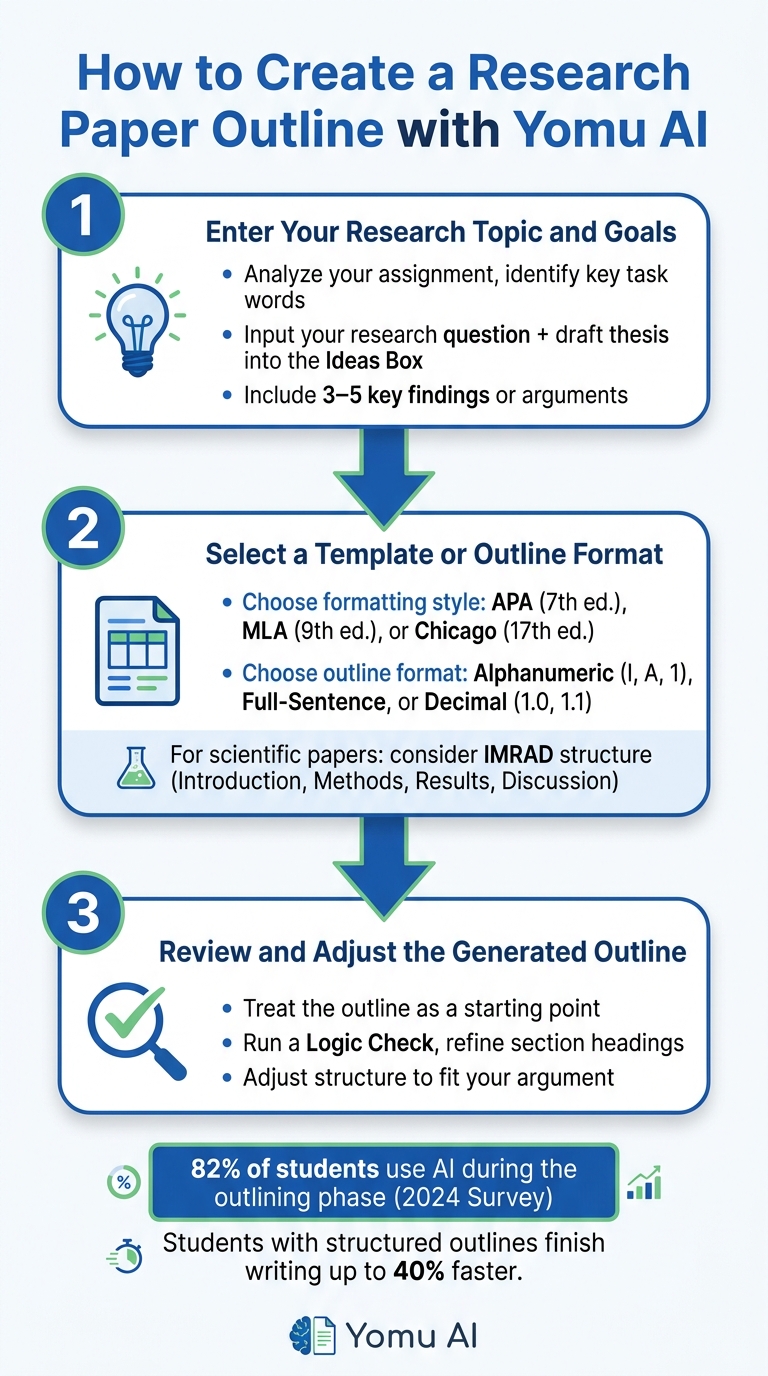
How to Create a Research Paper Outline with Yomu AI (3 Steps)
Starting with a blank page can feel overwhelming, but Yomu AI simplifies the process into three easy steps, saving you time and effort.
Step 1: Enter Your Research Topic and Goals
Begin by carefully analyzing your assignment. Look for key task words and any limitations on scope. Open the Ideas Box in Yomu AI and input your research question along with a draft thesis. To ensure the outline is detailed and relevant, include 3–5 key findings or arguments you'd like to explore in your paper. For instance, instead of a broad topic, provide a specific research question that focuses your work. Once you’ve clarified your topic and goals, you’re ready to move on to choosing a template.
Step 2: Select a Template or Outline Format
After submitting your topic, pick the formatting style that matches your assignment requirements. Yomu AI offers options like APA (7th ed.), MLA (9th ed.), or Chicago (17th ed.). Each style not only determines citation rules but also influences the structure of your paper. For example, APA outlines often include sections like Abstract and Method, which are essential for scientific papers.
Next, select an outline format that suits your needs. Options include Alphanumeric (I, A, 1), Full-Sentence, or Decimal (1.0, 1.1). If your paper is scientific, consider the IMRAD structure (Introduction, Methods, Results, and Discussion), widely used in fields like medicine and engineering.
Step 3: Review and Adjust the Generated Outline
Once Yomu AI creates your outline, treat it as a starting point. Carefully review the flow of ideas and run a "Logic Check" if needed to ensure everything aligns.
"With AI assistance, I can generate a solid first draft in hours, which gives me more time to refine the science rather than struggling with the writing process." - Dr. Fatima Rahman, Neuroscientist, Johns Hopkins University
Make adjustments to the structure or refine section headings to better fit your argument. This review step is crucial for creating a strong foundation before diving into the full draft.
Tips for Getting Better Results from Yomu AI
Give Clear and Specific Inputs
The quality of your output depends heavily on the clarity of your input. As Yomu AI says, "Generic prompts produce generic outputs."
Start by breaking down your assignment. Identify key task words, define the scope of your research, and note any formatting requirements. Instead of just providing a topic, craft a draft thesis statement and 3–5 specific findings you want to explore. This approach gives Yomu AI the context it needs to create a logical and relevant structure.
Here’s a practical example of how to structure your prompt: "Based on my thesis [insert thesis] and these key points [list findings], suggest a logical outline. For each section, include what evidence I should incorporate." You can also specify details like your academic field and target audience to ensure the tone and terminology align with your needs.
| Input Component | Example |
|---|---|
| Task | "Analyze", "Evaluate", "Compare" |
| Scope/Limitations | "Post-pandemic U.S. labor market" |
| Findings | "Data shows a 15% increase in remote work adoption..." |
| Format | "2,500 words, APA 7th edition" |
Using these strategies ensures your outline stays focused and sets a strong foundation for your first draft. Once you have a clear structure, you can start layering in your own insights.
Add Your Own Ideas to the AI-Generated Outline
While Yomu AI provides a solid structure, your personal insights are what bring the content to life. After generating an outline, review each heading and add subpoints that reflect your own research, observations, and arguments.
Don’t rely entirely on AI for references. Instead, incorporate verified academic sources to ground your work in credible evidence. This not only strengthens your paper but also ensures it reflects your unique perspective, making it feel like your work instead of a generic framework.
"The most effective use of AI in essay writing is as a collaborative tool rather than a replacement for your thinking." - Yomu AI
Treat the Outline as a Working Document
Once you’ve personalized the outline, treat it as a flexible guide rather than a rigid plan. Research is a dynamic process, and your outline should evolve as you uncover new information.
Regularly revising your outline helps maintain a logical flow and address any gaps. A 2024 study found that students who used AI as a collaborative tool - refining and building on outputs rather than passively accepting them - achieved better learning outcomes than those who used it primarily for content generation with minimal edits.
Conclusion: Building a Strong First Draft with Yomu AI
Starting a research paper doesn’t have to feel like staring into the abyss of a blank page. With the right structure in place, drafting becomes so much easier - and that’s exactly where Yomu AI steps in to help.
This tool takes care of the heavy lifting: generating a logical outline, formatting citations, and even checking for plagiarism, all in one place. By keeping everything in a single interface, you save time hopping between tools and can focus more on crafting your argument. In fact, research shows that students who use structured outlines finish their writing assignments up to 40% faster than those who don’t.
These time-saving features directly translate into better writing efficiency.
Key Takeaways
Here’s what you can take away from this guide:
- Start with clarity. A well-defined thesis and clear findings lead to more effective outlines.
- Use the outline as a guide. Treat it as a framework you can enhance with your own analysis and carefully verified sources.
- Stay flexible. As your research evolves, so should your outline - this adaptability strengthens your final paper.
- Double-check citations. AI references can sometimes miss the mark, so always verify them before turning in your work.
The stats are hard to ignore: around 78% of papers that follow a structured outline earn a B or higher, compared to just 52% of papers without one. A strong outline not only saves time but also boosts the quality of your work. It’s more than just an organizational tool - it’s a direct investment in your grade.
Experts agree on the transformative impact of AI tools in the writing process.
"AI writing tools aren't just changing how papers are written - they're fundamentally altering every phase of the research process, from ideation to final submission." - Dr. Eleanor Simmons, Director of Educational Technology, Stanford University
Yomu AI is most powerful when you’re in control. Use it to kick-start your process, simplify the workflow, and build a solid foundation. Then, layer in your own insights to turn that structure into a standout paper.
FAQs
Will using Yomu AI get flagged as academic misconduct?
Using Yomu AI responsibly and giving proper credit for its contributions is generally not considered academic misconduct. The tool can be incredibly helpful for tasks like paraphrasing, organizing citations, and polishing your writing. That said, relying on it too heavily - such as using it to generate entire sections of your work without acknowledgment - can lead to ethical issues. Think of it as a resource to enhance your writing, not as a replacement for your own academic efforts.
How do I make an AI outline sound like my own work?
To truly make an AI-generated outline feel personal, take the time to refine it so it reflects your voice and perspective. Start by tweaking the points to align with your ideas, and don't hesitate to add your own insights or examples. Adjust the language to fit your tone - whether that's casual, professional, or somewhere in between. If you're working with specific formatting or submission guidelines, integrate those as well. This way, you'll keep the AI's helpful structure but shape the outline to suit your individual needs.
Can Yomu AI handle IMRaD papers and long-term projects?
Yomu AI is designed to support IMRaD papers and long-term research projects with a suite of helpful features. These include literature review assistance, citation management, data analysis tools, and AI-driven writing aids. Together, these tools simplify the writing process while helping you craft well-structured and detailed research papers.