

How to Use AI in Essays Without Getting Flagged
AI tools can help you write essays more efficiently, but using them incorrectly can lead to plagiarism or academic integrity issues. The key lies in using AI responsibly to support your work without replacing your critical thinking. Here’s how:
- Understand Your School’s AI Policies: Check your syllabus, university guidelines, or ask your instructor about AI usage rules. Policies often vary and may require disclosure.
- Use AI for Support Tasks: Tools like Yomu AI can assist with paraphrasing, summarizing, grammar checks, and citation formatting. Avoid relying on AI to generate full essays or arguments.
- Cite Sources Properly: Always credit your sources and double-check AI-generated citations for accuracy. Missing attributions can trigger plagiarism flags.
- Run a Plagiarism Check: Before submitting, use AI plagiarism tools to ensure originality and address flagged content.
- Disclose AI Use When Required: Be transparent about how AI was used in your work, especially if it contributed significantly to your process.
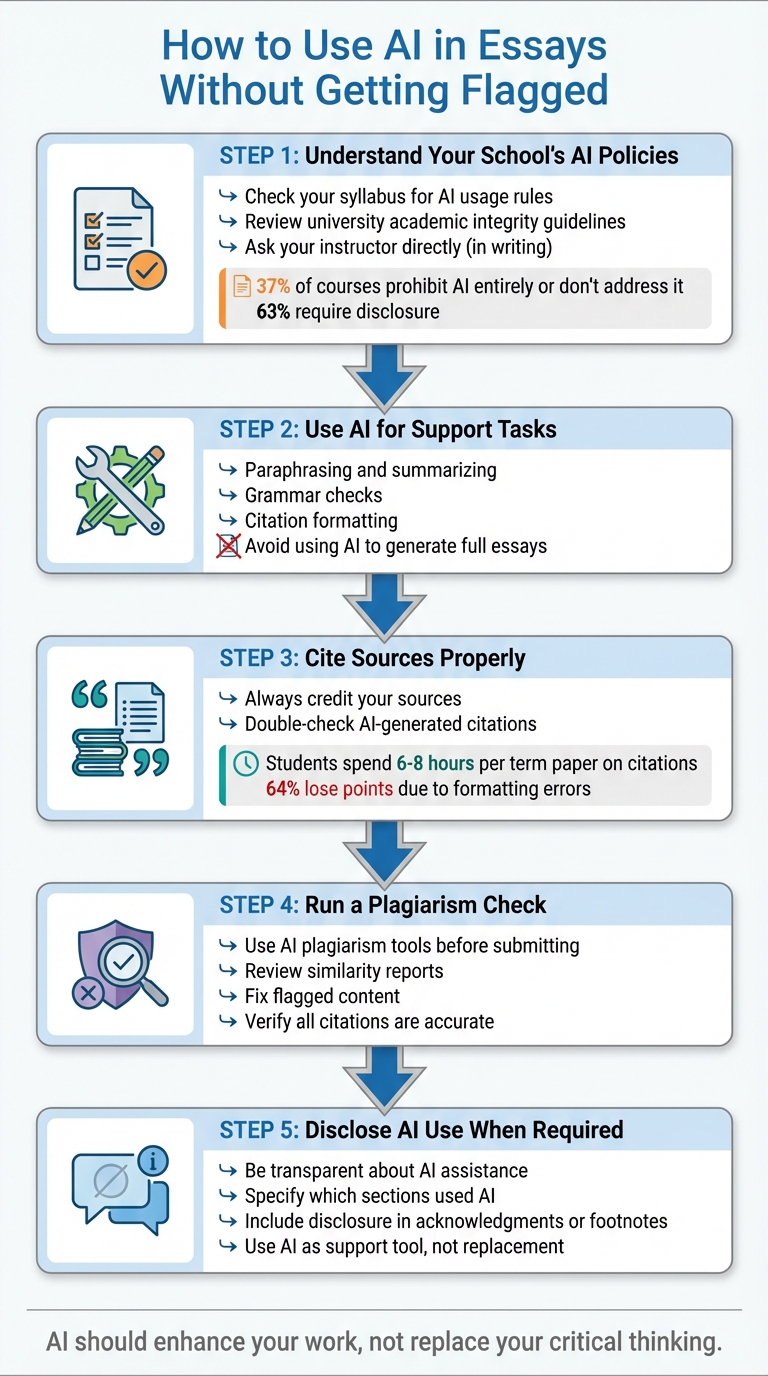
5 Steps to Use AI in Essays Responsibly Without Getting Flagged
342. AI & Academic Integrity: How to Use AI Ethically in School (Student Guide)
sbb-itb-1831901
Know Your School's AI Policies
Before diving into Yomu AI, it's essential to understand your school's stance on AI usage. Policies can vary widely - not just between institutions but even across departments, instructors, and specific courses. Knowing these rules ensures your use of AI aligns with both institutional and course-specific expectations.
Check Your University's AI Rules
Understanding your university's guidelines is the first step toward using AI responsibly in your academic work.
Start by reviewing your course syllabus. Often, the syllabus serves as the primary reference for course-specific rules. Many instructors outline their expectations for AI use directly in the syllabus, tailoring them to the course's goals. If the syllabus doesn't provide clarity, check your institution's broader academic integrity guidelines.
Still unsure? Reach out directly to your instructor - preferably in writing - and save their response for future reference. As Yale's Undergraduate Regulations state:
Always check with your instructor before using these tools to produce your Yale coursework. Guidelines about these practices may change over time, so be sure to ask for the most up to date policy.
For additional clarity, you can also consult your university's writing center, library, or academic advising office. These resources can help you navigate ethical AI use.
Identify What You Can and Cannot Do with AI
Once you've reviewed the policies, it's important to categorize your school's stance on AI. A 2026 study analyzing 210 course-level AI policies revealed that 37% of courses either prohibit AI entirely or don't address it at all, while 63% require some form of disclosure. Many institutions adopt a "Traffic Light" model to simplify these rules:
- Red: AI use is banned.
- Yellow: AI is allowed but with restrictions and mandatory disclosure.
- Green: AI use is permitted within specific guidelines.
Most schools allow AI for tasks like brainstorming, outlining, or grammar corrections but draw the line at using it to generate complete essays or replace your own critical thinking. Some institutions have even introduced creative requirements to ensure transparency. For instance:
- In August 2025, Austin Community College's Horticulture department began requiring students to document the tool used (e.g., ChatGPT 5o), the date of use (e.g., 8/18/2025), and the sections affected (e.g., "edit grammar in the last 3 pages").
- In early 2026, Kennesaw State University introduced a "Carbon Impact Statement", asking students to estimate the environmental impact - such as CO₂ emissions and water usage - of their AI interactions.
If your instructor's policy remains unclear, try the "Two-Question Test": ensure expectations are clearly defined and confirm your understanding of them. This approach can help you navigate ambiguous guidelines with confidence.
Use Yomu AI for Paraphrasing and Summarizing
Before diving into Yomu AI, make sure you’re familiar with your school’s AI usage policies. Once you’re in the clear, Yomu AI’s paraphrasing and summarization tools can help you process research efficiently and express ideas in a way that feels like your own.
Paraphrase to Rewrite Content in Your Own Words
Yomu AI’s paraphrasing tool lets you rework source material while keeping its original meaning intact. This helps you avoid directly copying text while improving clarity and flow. The tool analyzes your input and offers suggestions to refine your writing without straying from the core message.
Using it is simple: paste your source text into the tool, select a tone and length, and review the multiple versions it generates. Be sure to edit the output to reflect your personal voice and insights - this step is crucial to ensure the text represents your understanding rather than relying entirely on AI.
For instance, if the original text says, "Climate change is caused by human activities releasing greenhouse gases", Yomu AI might rephrase it as, "Human-induced emissions of greenhouse gases drive global climate shifts." You could then expand on this by adding your perspective: "Anthropogenic greenhouse gas emissions from industrial activities are accelerating climate change, as evidenced by rising global temperatures." This process retains the original meaning while showcasing your critical thinking.
After paraphrasing, you can run the text through Yomu AI’s built-in plagiarism checker to ensure it’s original before submitting it. Once that’s done, the summarization tool can help you break down lengthy sources into digestible key points for deeper analysis.
Summarize Long Sources for Research
Yomu AI’s summarization tool helps boil down lengthy texts into concise points, saving you time and making it easier to evaluate sources. This feature is ideal for quickly identifying relevant ideas without having to wade through pages of material.
To use it effectively, input the full article or passage, select your preferred summary format (like bullet points or a short paragraph), and review the output for accuracy. Then, rephrase the summary in your own words, cite the original source, and use the condensed information to support your essay’s arguments.
When using this tool, try targeted prompts like "major debates on climate policy" instead of broad requests. This approach focuses the tool on extracting details that directly back up your thesis. As Daniel Felix wisely points out:
The most effective use of AI in essay writing is as a collaborative tool rather than a replacement for your thinking.
Verification is non-negotiable - always compare the AI-generated summary to the original text to ensure accuracy and avoid misrepresentation. While the tool helps identify themes and connections, the final analysis and interpretation should always be your own to maintain academic integrity.
Cite Sources Correctly with Yomu AI's Citation Tool
Citing sources properly is a cornerstone of academic integrity. It ensures your ideas are clearly distinguished from those of others and shields you from plagiarism concerns. Yomu AI, known for its paraphrasing and summarization tools, also offers a citation tool that guarantees accurate credit for every source. It supports major academic formats like MLA, APA, Chicago, and IEEE, helping you avoid formatting mistakes.
Generate Citations Automatically
Yomu AI simplifies citation formatting by generating references instantly based on the information you provide. All you need to do is enter a URL, book title, or article details, choose your citation style (e.g., APA or MLA), and the tool will create a complete, properly formatted reference. It handles everything - punctuation, author names, publication dates - saving you hours of manual effort. On average, undergraduate students spend 6–8 hours per term paper on citation formatting, and 64% of them lose points due to formatting errors.
For example, if you need to cite a web article in APA format, simply paste the URL into Yomu AI, select APA, and it will generate a citation like this:
AuthorLast, F. M. (2026, January 15). Title of article. BC Campus. https://bccampus.ca/...
While the tool is highly efficient, it's crucial to double-check citation details for accuracy, as AI tools can occasionally misattribute publication years or author names. Correctly formatted citations not only save time but also contribute to a polished and professional academic paper.
Prevent Plagiarism with Proper References
Accurate citations are a key defense against plagiarism. Even if you've paraphrased content well, missing attributions can still trigger plagiarism detection tools. Properly formatted citations help ensure your work is free from these flags by including all necessary elements, such as DOIs and retrieval dates, which plagiarism checkers often look for.
After generating citations with Yomu AI, take advantage of its integrated plagiarism checker before submitting your work. This extra step ensures that all sources are properly credited, reinforcing the role of AI as a research assistant rather than a content creator. By doing so, you align with academic expectations and maintain the integrity of your work.
As Professor Jordan P. from NYU puts it:
The important skill is understanding which sources to cite and why, not memorizing style manuals.
Check for Plagiarism with Yomu AI Before Submitting
Running a plagiarism check before submitting your essay is a must. Even if you've worked hard to paraphrase and cite sources correctly, small mistakes can still slip through and get flagged by detection software. Yomu AI makes this process easier with its built-in plagiarism checker, which scans your document directly within the editor. No need to jump between platforms - everything happens in one place. Let’s break down how this tool works and how it helps you address flagged content.
How the Plagiarism Checker Scans Your Work
Yomu AI’s plagiarism checker analyzes your text by comparing it against a massive database of web content and academic publications. When you run a scan, it generates a similarity report highlighting sentences that match existing sources. For example, during testing, the tool not only identified a match from a published paper but also found other papers that cited the same source.
The checker focuses on high-threshold matches, meaning it flags clear similarities while ignoring minor overlaps. However, it may not always catch near-verbatim or heavily paraphrased content. That’s why it’s important to manually review flagged sections, especially if your institution enforces strict plagiarism policies.
Fix Flagged Content to Ensure Originality
After reviewing your similarity report, it’s time to refine your work. Use the flagged sections as a guide to decide whether to add a citation or rewrite the content. Compare the highlighted text with the original source to see if the structure, word choice, or style is too similar. If it is, you can use Yomu AI’s paraphrasing tools to make adjustments - try swapping out common words for synonyms or switching between active and passive voice.
Once you’ve made your edits, run the plagiarism checker again to confirm the issues are resolved. To be extra thorough, double-check your citations by asking Yomu AI to review them. For instance, you could use a prompt like: "Please check if the following citations are formatted correctly in APA style". This final step ensures your sources are properly credited, reducing the risk of accidental plagiarism.
Disclose Your AI Usage Honestly
Being open about using AI tools, like Yomu AI, is essential for maintaining integrity and meeting academic expectations. Many institutions require students to acknowledge AI assistance to avoid potential plagiarism concerns. The key is understanding when disclosure is necessary and how to do it appropriately. Below, you'll find clear guidelines on when and how to disclose your use of AI tools.
When and How to Mention AI Assistance
You should disclose AI usage whenever it significantly contributes to your work. This includes tasks like generating outlines, drafting sections, paraphrasing, or summarizing research. On the other hand, minor grammar fixes typically don’t require disclosure - unless your instructor specifies otherwise.
"When specific guidance is unavailable, default to transparency. Disclose any significant AI assistance in your work, explaining how the technology was used and what portions involved AI input." – Daniel Felix, Author
Be clear about what the AI handled versus what you contributed. For example, you could state: "This essay utilized Yomu AI for paraphrasing sections on pages 3-5 and generating citations for sources 7-10; all final content, arguments, and edits reflect the author's original work". Include this statement in the acknowledgments, title page, or as a footnote - depending on your instructor’s preferences. Always refer to your syllabus or institutional guidelines for specific requirements.
Next, let’s discuss how to frame AI as a helpful tool that complements your work rather than replacing your effort.
Use AI as a Support Tool, Not a Replacement
Think of Yomu AI as a research assistant, not a ghostwriter. While it can refine your ideas, your original arguments, critical thinking, and personal voice should remain the foundation of your work.
"Yomu is meant to be used in conjunction with, not as a replacement for, the student's own writing and research abilities." – Yomu AI Ethics Statement
A 2026 study revealed that students who approach AI responsibly see it as a tool for improving clarity and organization, while ensuring their core arguments remain their own. For example, if you use AI to summarize a source, double-check the summary against the original material. Similarly, if you rely on AI for brainstorming, make sure the final direction reflects your independent research. The ultimate goal is to enhance your skills and learning process - not bypass them.
Conclusion
Using Yomu AI responsibly helps maintain your academic integrity. Start by reviewing your institution's guidelines to understand what’s permitted. Then, use Yomu AI’s tools ethically: rely on paraphrasing and summarizing features to support your research, generate proper citations to avoid plagiarism, and run plagiarism checks before submitting your work. These tools align with what experts consider the most ethical use of AI - enhancing clarity and structure without replacing your original ideas.
To recap: always check institutional policies, refine your writing with careful paraphrasing and accurate citations, and verify your work with plagiarism checks. Transparency is key - disclose AI’s role in your work and ensure its outputs are accurate. If AI significantly contributes to your process, such as through brainstorming or drafting, acknowledge it clearly in your footnotes or acknowledgments. Instead of relying on detection tools, take a proactive approach by being upfront about how AI supported your work and emphasizing your personal contributions.
"Academic work must honestly represent your understanding, research, and intellectual effort." – Daniel Felix, Author
It’s also important to view AI as a supplementary tool rather than a replacement for your own critical thinking. Yomu AI can assist with tasks like AI writing assistance like grammar corrections or citation formatting, but your original arguments and analyses should always come from you. This ensures compliance with academic standards while helping you build the skills your assignments are designed to develop.
When in doubt, disclose any major AI contributions. By treating AI as a tool to enhance your work - not a shortcut to bypass learning - you’ll create authentic essays that reflect your genuine understanding while staying firmly within ethical boundaries.
FAQs
How can I tell if my class allows AI?
Before diving into AI tools for your studies, it’s important to check your course syllabus or your institution’s academic integrity policies. The rules can differ widely - some classes might allow limited use of AI tools as long as you disclose it, while others might completely prohibit them.
If you’re not sure about the guidelines, don’t hesitate to ask your instructor or academic advisor directly. Open communication is key, and being transparent about using AI tools (when allowed) helps uphold academic integrity.
What AI use usually needs disclosure?
Transparency is essential when AI plays a major role in your work, like paraphrasing, summarizing, formatting citations, or producing substantial portions of text. If your institution requires disclosure, being upfront about AI assistance helps maintain academic integrity. It also reduces the risk of unintentional plagiarism and ensures your work follows ethical and institutional guidelines.
Can AI-made citations be wrong?
AI-generated citations can occasionally miss the mark, with issues ranging from incorrect source details to formatting errors or flawed metadata. It's crucial to double-check and verify these citations to ensure they meet academic standards and maintain accuracy.