
GLM Foundation Model for Academic Writing and Research
If I use GLM for academic writing, I treat it as a draft tool - not a source of truth. It can help me turn notes into outlines, draft literature review sections, paraphrase passages, and format citations in 700+ styles. But I still need to check every fact, quote, page number, and reference before I submit anything.
Here’s the short version:
- What it does: helps me brainstorm, outline, draft, revise, summarize, paraphrase, and format references
- Where it helps most: literature reviews, thesis statements, research questions, and revision
- Main risk: made-up citations and wrong source details that look correct
- Best way to use it: give clear prompts, limit it to my sources, and verify each claim myself
- Key stat: planning sources before drafting can cut fabricated references by 18%–26%
A simple way I think about it: GLM can help me write the paper faster, but it cannot tell me whether the paper is right. That means my job is still to check source meaning, citation accuracy, plagiarism risk, and whether each paragraph supports the main argument.
| Task | GLM can help with | I still need to check |
|---|---|---|
| Literature review | Grouping notes by theme or gap | Whether the grouping matches the sources |
| Thesis and research question | Drafting options and narrowing scope | Whether the claim fits the assignment |
| Summaries and paraphrases | Shortening dense text and rewording | Meaning, attribution, and plagiarism risk |
| Citations | Formatting references and in-text citations | Fake sources, wrong page numbers, bad URLs |
| Revision | Tone, flow, and transitions | Accuracy and argument quality |
Below, I’ll break down how I’d use GLM across the full writing process while keeping academic integrity in place.
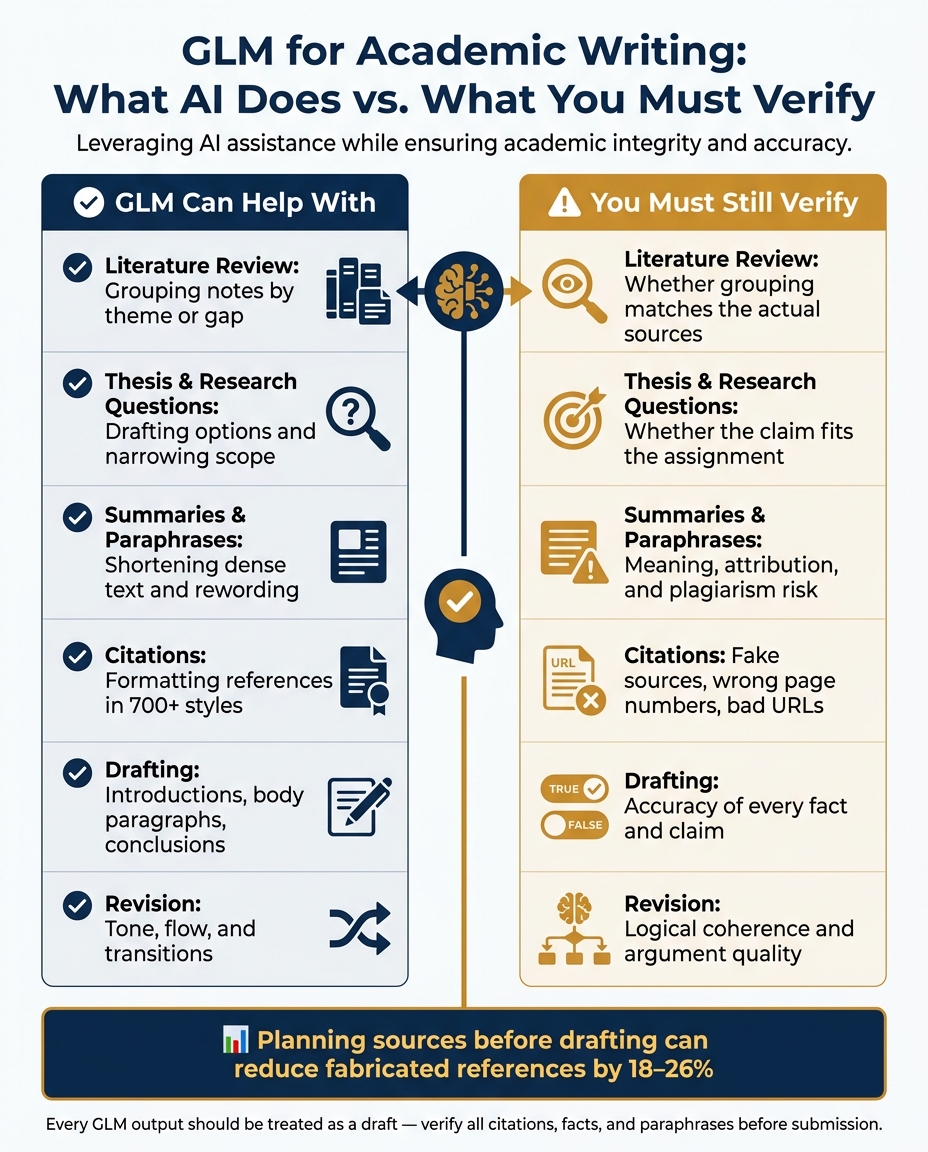
GLM for Academic Writing: What It Does vs. What You Must Verify
Core Academic Tasks a GLM Can Support
Literature Review Drafting and Source Synthesis
A literature review is more than a stack of summaries. It's an argument built from many sources.
GLM can help you turn messy notes into a themed review by grouping sources around shared findings, methods, or research gaps.
This works best step by step. Start with search terms. Search academic databases. Then map each source to a specific claim before you draft. From there, GLM can build a sentence-by-sentence outline that links particular sources to particular arguments. Planning ahead can reduce fabricated references by 18–26%, which makes citation accuracy easier to control.
Ask the model to pull exact lines from abstracts to show why each source belongs in the review. That keeps the synthesis tied to what the sources actually say, instead of what the model fills in on its own.
Once you have that source map, use it to tighten the paper's main claim.
Thesis Statements, Research Questions, Summaries, and Paraphrases
With the source map in place, you can narrow the topic into a thesis statement and research question.
Give GLM your broad subject and a rough argument, and it can draft thesis options, narrower research questions, and short guidance on how to choose among them. That's useful for narrowing the field. It shouldn't replace your judgment.
GLM can also turn dense readings into short notes. And it can paraphrase source material so you don't lean too hard on direct quotes. But paraphrased text still needs a citation, and you still need to check it line by line for accuracy. The model may change the wording, but it can't confirm that the meaning stayed intact. That part is on you.
Citation Support for Papers and Research Notes
Once your argument is set, keep each citation attached to the claim it supports as you draft.
Academic paper citations can eat up a lot of time, especially when you're working across several style guides. GLM-powered tools can format references in more than 700 citation styles. They can also help you organize a personal reference library that you can reuse across documents.
Yomu AI builds citation support right into the writing editor, so you can manage in-text citations while drafting instead of bouncing between tools. That makes sense in a workflow where you're building an argument and need to keep sources tied to specific claims as you write.
sbb-itb-1831901
How to Use GLM Across the Writing Workflow
From Brainstorming to Outline Development
A lot of writing problems show up before the first draft. The topic is too broad. The main point feels fuzzy. The structure starts fine, then falls apart halfway through. GLM is most helpful right here.
Start with a broad topic and ask for three or four narrower research angles. Then choose the one that fits your assignment and ask for a section-by-section outline, with each section tied to one central claim. Treat that outline as a working draft, not a final plan. Ask GLM to explain why it arranged the sections in that order. That simple step puts the logic on the table, so you can challenge anything that feels thin or out of place.
Once the outline feels solid, use it to draft each section with a clear job to do.
Drafting Introductions, Body Paragraphs, and Conclusions
After the outline is in place, GLM can draft sections one at a time - but only if you give it enough context. If your prompt is vague, the draft usually will be too. Be specific about the section type, audience, tone, and length.
Body paragraphs are where GLM's thinking mode can help most, especially when you're pulling together dense sources or setting up a counterargument. It can work through the argument before it starts writing, which helps cut shallow or circular reasoning. Include your full thesis statement in the prompt every time so the introduction, body, and conclusion stay in sync.
After the draft is on the page, use GLM to tighten wording and check that each section still supports the thesis.
Revision Support for Clarity, Tone, and Coherence
Revision is where many writers get stuck. After staring at the same draft for hours, it's tough to spot repetition, weak transitions, or a shift in tone. GLM can flag all three.
Paste in one paragraph and ask it to tighten the academic tone, cut redundant phrasing, or rewrite the transition sentence so it connects more cleanly to the next section. After you revise, give GLM the updated paragraph along with your original research question and ask whether the revision still supports the argument. That way, each section stays tied to the outline even as the draft changes.
Accuracy, Citation Quality, and Academic Integrity
Once you have a draft, the next job is verification.
GLM can help you write academic prose faster. But every fact, citation, and paraphrase still needs a human check.
What GLM Can Help With Versus What You Must Verify
GLM-4 shows strong benchmark scores. That sounds good, but benchmark scores don't promise source-level accuracy.
So the best way to use GLM is simple: let it help with the draft, then check anything tied to evidence, attribution, or source details yourself.
| Task | Helps With | Verify Yourself |
|---|---|---|
| Structure & Flow | Draft structure | Logical coherence and adherence to specific journal or thesis guidelines |
| Summarization | Summarizing long papers | Ensuring the summary captures the meaning of the original passage |
| Citations | Formatting existing references into APA, MLA, or Chicago style | Hallucinated sources, incorrect URLs, or wrong page numbers |
| Paraphrasing | Rewriting text for better flow or clarity | Plagiarism risk and faithfulness to the source |
| Fact-Checking | Surface claims for review | Confirming dates, names, and specific experimental results against primary sources |
The big risk isn't tone or wording. It's unchecked claims slipping into your paper and looking like scholarship.
Checking Facts, Citations, and Paraphrases Before Submission
Before you submit anything, verify every cited source on your own. That includes URLs, page numbers, author names, publication details, and quoted material. GLM can produce a polished reference for a source that doesn't exist at all, so every citation should be treated as unconfirmed until you've checked it yourself.
Paraphrasing needs the same care. A rewritten sentence still needs a citation, and it still needs a line-by-line comparison with the source. A good habit is to read the original passage, step away from it, write the idea from memory, and then use GLM only to smooth the wording. As Daniel Felix notes:
"If the idea, structure, or key terms came from a source, cite it - even after paraphrasing."
In U.S. academic settings, plagiarism includes unattributed ideas, not only copied wording. Run one final plagiarism check for academic papers before submission. The last review belongs to the writer, not the model.
Best Practices and Key Takeaways
How to Write Prompts for Better Scholarly Output
After you’ve drafted and revised, prompt control has a big effect on how useful GLM is in the final pass.
Use specific prompts. Spell out the task, discipline, section type, tone, word count, citation style, and source limits. A simple structure works well: [task], [discipline], [section type], [tone], [word count], [citation style], and only these sources. That last part matters. When you set source limits, you keep the model focused on your uploaded material instead of pulling from outside it.
Match expansion to the writing task. Use a higher expansion level only when you need more development from thin notes. In plain English: don’t turn every short prompt into a long one just because you can.
Add a bridge sentence before the table: use expansion level to match the drafting stage, not to inflate every response.
| Expansion Scale | Best Academic Use Case |
|---|---|
| 3x | Standard development for discussion posts and short answers |
| 5x | Creating a full paragraph from a single claim with transitions and nuance |
| 10x | Maximum elaboration for sparse outlines, intros, or literature summaries |
When GLM Is Most Useful and What to Remember
GLM works best when you need to turn notes into prose, draft literature review sections, format citations, and tighten revision. These prompts matter most when you’re building literature reviews, thesis statements, summaries, paraphrases, and citation-ready notes.
Still, every output should be treated like a draft. Add your own analysis, verify citations, and compare the text with your notes to catch drift. That step is where a decent draft becomes something you can actually use.
Use these prompts as a final drafting layer, then check your institution's AI policy before submission.
FAQs
What is a GLM foundation model?
A General Language Model (GLM) is a foundation model built for a broad set of natural language processing tasks. It learns by masking spans of text, then filling them back in one step at a time.
That setup blends the strengths of autoencoding and autoregressive models. In plain English, it lets one model handle both language understanding and text generation with shared parameters.
Can I use GLM without risking plagiarism?
Yes - use GLM-based tools like Yomu AI as a support assistant, not as the author.
That means a simple rule of thumb: let the tool help with the draft, but keep the thinking and final wording in your hands. Check any AI-made citations, rewrite the text in your own voice, and edit the draft yourself.
Before you submit, use the integrated plagiarism checker to scan for similarity. It’s a smart last pass, but it doesn’t replace your judgment.
You’re still responsible for your argument, your analysis, and proper attribution.
How do I quickly verify GLM citations?
Cross-check GLM-generated citations with the original sources. AI output can include errors, and sometimes it invents references that don’t exist.
Use the platform’s real-time citation verification system to compare each citation against academic databases.
For the most reliable results, include source identifiers such as DOIs, ISBNs, or direct database links. Then manually check the details that matter most, like page ranges and publication dates.