

Configuring Roles in Academic Writing Platforms
Role-based access control (RBAC) is a method used in academic writing platforms to manage access and permissions based on user roles. This approach ensures sensitive data like manuscripts and research materials remain secure while allowing users to perform their tasks effectively. Here's the key takeaway:
- RBAC Basics: Authentication verifies identity, while authorization grants access based on roles (e.g., Admin, Editor, Writer).
- Core Elements: Users (individuals), Roles (grouped access needs), and Permissions (specific actions allowed).
- Tiered Roles: Example roles include Admins (manage settings), Editors (oversee content), and Writers (edit documents).
- Access Scopes: Permissions can be applied at organizational, workspace, or resource levels, ensuring precise control.
- Best Practices: Use the least privilege principle, audit roles regularly, and integrate tools like Single Sign-On (SSO) for efficiency.
Platforms like Yomu AI simplify RBAC by offering tools for secure collaboration, such as citation management and plagiarism detection, without compromising access control. By properly configuring roles and permissions, academic teams can maintain security and streamline their workflows.
Role-Based Access Control (RBAC) Explained: How It Works and Why It Matters for Security
Core Elements of Role-Based Access Control
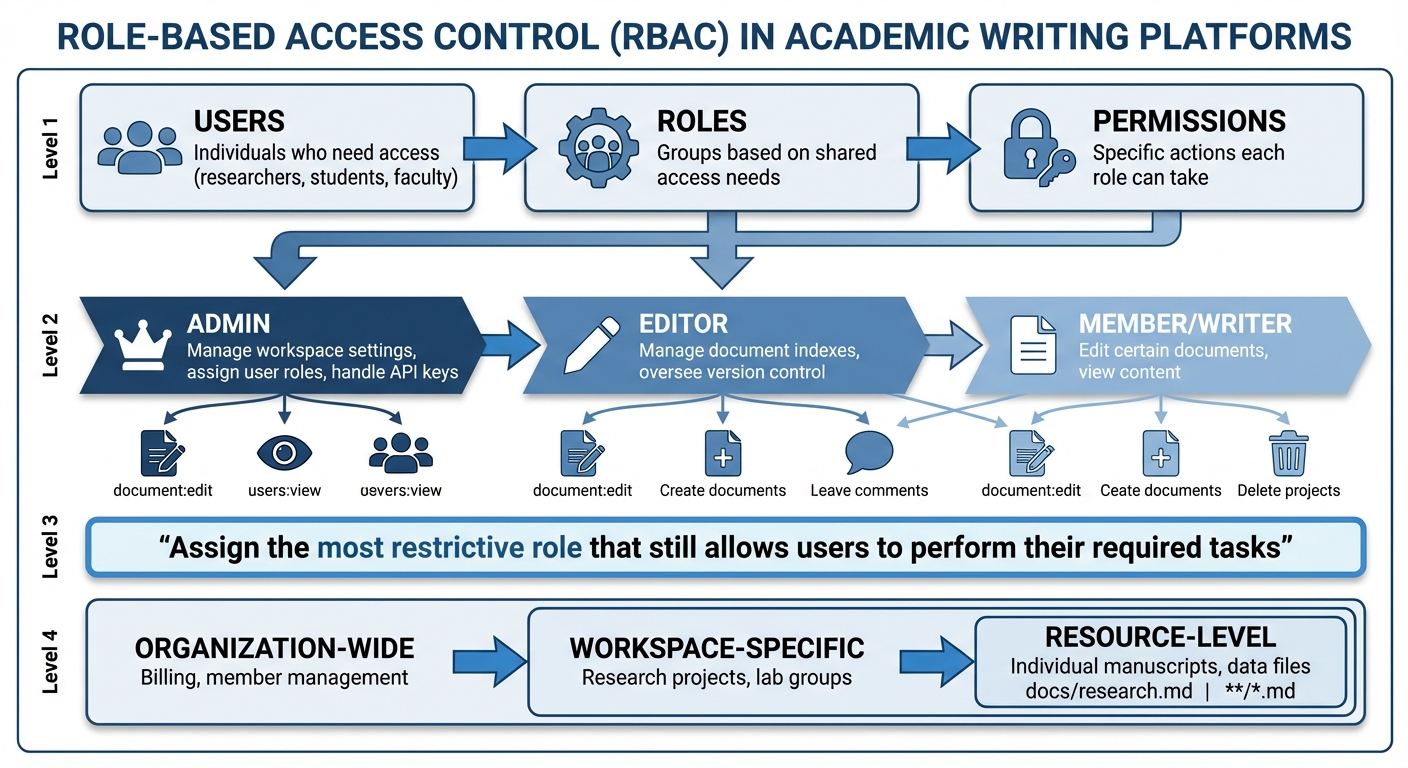
RBAC Structure: Users, Roles, Permissions and Access Scopes in Academic Platforms
Role-Based Access Control (RBAC) revolves around three key components: Users, Roles, and Permissions. Users are the individuals who need access - think researchers, students, or faculty. Roles group these users based on shared access needs, such as Admin, Lead Author, Editor, or Reviewer. Permissions, on the other hand, determine the specific actions each role can take, like creating documents, editing drafts, leaving comments, or deleting projects.
Roles and Permissions
Many academic writing platforms organize access using a tiered role structure, with each role carrying distinct responsibilities. For instance, an Admin has the broadest permissions, managing workspace settings, assigning user roles, and handling API keys. An Editor might focus on tasks like managing document indexes or overseeing version control, while a Member or Writer typically has more limited access, such as editing certain documents or simply viewing content.
"Assign the most restrictive role that still allows users to perform their required tasks".
This principle helps balance security and productivity by reducing unnecessary access.
Permissions can also be customized to an impressive degree, allowing restrictions at the page or navigation level. For instance, a guest reviewer might only view a specific manuscript they are evaluating, while internal lab members could have full access to a research database. Platforms often use consistent naming conventions for permissions - like document:edit or users:view - to streamline management and ensure clarity.
Access Scopes
Access scopes define where a role’s permissions apply, limiting actions to specific areas. These scopes generally operate on three levels: organization-wide (covering settings like billing or member management), workspace-specific (focused on particular research projects or lab groups), and resource-level (targeting individual manuscripts or data files).
Scopes are often tied to resource identifiers, such as file paths (docs/research.md) or patterns (**/*.md), to match specific content sets. This level of control ensures platforms can automatically filter what users see, hiding navigation links or sensitive data outside their assigned scope. For example, a postdoctoral researcher working on a grant project could have Editor permissions within that workspace but no access to unrelated lab projects, even if they belong to the same organization.
These foundational elements pave the way for the practical steps in configuring roles and permissions, which follow in the next section.
Checklist for Setting Up Roles and Permissions
Using the principles of RBAC (Role-Based Access Control), follow this checklist to set up roles and permissions for smooth and secure collaboration.
Review Your Collaboration Needs
Start by mapping out your workflows. Define each team member's responsibilities - whether it's drafting, reviewing, managing citations, conducting plagiarism checks, or giving final approvals. Collaborate with stakeholders to ensure all critical writing and editing tasks are accounted for.
Create and Assign Roles
Establish a clear hierarchy of roles. In academic settings, common roles include:
- Administrators: Manage workspace settings and control user access.
- Lead Editors: Supervise manuscript assignments and oversee the editing process.
- Authors: Focus on adding and developing content.
- Reviewers: Provide feedback by viewing documents and leaving comments.
For each role, outline specific permissions. For instance, Authors may only add content, while Editors can handle version control and publication. Stick to the principle of least privilege - grant users only the access they need to perform their tasks.
Build a Permissions Table
Create a table that links roles to their specific permissions. This table should clearly show which roles can perform tasks like editing documents, managing citations, running plagiarism checks, approving content, or adjusting workspace settings. When possible, connect role assignments to your institution's HR or student information systems. This way, access updates automatically when team members join or leave a project. Regularly audit this table to remove outdated or unnecessary access .
Once roles and permissions are clearly defined, you're ready to move forward with assigning specific access scopes in the next section of the checklist.
sbb-itb-1831901
Checklist for Assigning Roles and Setting Access Scopes
Once your roles and permissions table is ready, the next step is assigning roles to users and defining their access scopes. This ensures your framework is active and secure.
Choose Users and Groups
Head to your platform's Settings or Members section and select Add User. Enter the user's name and email, then assign the role you’ve already outlined.
For a more streamlined approach, use group management. Instead of assigning roles individually, organize users into groups - like "Research Team A" or "Graduate Reviewers" - and assign roles to the group as a whole. This saves time and ensures everyone on the same project has consistent access.
After organizing users, it’s time to define where their roles apply by setting access scopes.
Set Access Scopes
Access scopes decide whether a role applies to the entire workspace or specific areas like documents or projects. Broad roles like Admin or Owner allow organization-wide access, while resource roles limit permissions to specific items - like project folders or individual notebooks. Using resource roles is a great way to tighten security and align access with job responsibilities. For example, you can restrict a Reviewer’s access to just their assigned manuscripts.
Configure these access boundaries through your platform’s Resource Roles or API Access settings.
Test Role Assignments
Before finalizing, test the roles to confirm that access is restricted to authorized resources. Log in as a test user (or have a team member check) to make sure they can only view their assigned materials. Verify that deny settings are working properly, nested group permissions are accurate, and overlapping assignments in additive RBAC models don’t create unintended elevated access.
If you find any issues, go back to your user management list, click the Edit icon next to the user’s name, adjust their role or access scope, and save the changes. Continue fine-tuning based on your test results.
Platforms like Yomu AI simplify this entire process with user-friendly tools, making it easier to maintain secure and efficient collaboration in academic environments.
Best Practices for Role Configuration and Secure Collaboration
Apply Least Privilege Principle
The Principle of Least Privilege (PoLP) focuses on giving users access to only the resources they need to perform their tasks effectively. This means assigning the most restrictive role that still allows them to get their work done. For example, if a graduate assistant's job is limited to reviewing submitted papers, they should be assigned a Viewer role instead of an Editor role, which would grant unnecessary modification permissions.
Keep administrative access tightly controlled. A surprising 67% of IT teams overprovision access, which can lead to serious vulnerabilities. To avoid this, restrict Admin roles to primary workspace owners and assign specialized roles like Document Index Editor or Deployment Editor to others. These roles provide specific capabilities without granting full control over the organization.
Finally, make it a habit to review role assignments regularly to ensure they remain appropriate and secure.
Audit and Update Roles Regularly
Projects and teams are constantly evolving, which makes regular audits of role assignments essential. Use the centralized management interface to review and adjust access as team members join, leave, or switch responsibilities.
For temporary needs, consider time-limited roles. For example, if an analyst needs elevated permissions to investigate a specific issue, grant the necessary access but revoke it as soon as the task is completed. Keep in mind that Role-Based Access Control (RBAC) often works as an additive system, meaning a user's effective permissions are the combined total of all their assigned roles. Be vigilant about overlapping assignments to ensure no one inadvertently gains more access than necessary.
This ongoing review process lays a strong foundation for integrating RBAC with advanced tools.
Combine RBAC with Platform Tools
Once roles are clearly defined and audits are in place, you can take security and collaboration to the next level by integrating platform tools. For example, connect your RBAC system with Identity Provider (IdP) group mappings through Single Sign-On (SSO) or Directory Sync. This automation simplifies role assignments and ensures they align with your organizational structure. It’s a win-win: reduced manual effort and consistent access control.
Tools like Yomu AI add another layer of security and efficiency. By integrating citation management and plagiarism-checking features, Yomu AI allows reviewers to provide feedback without risking accidental modifications or deletions of the original work. This combination of RBAC and platform tools not only secures your workspace but also enhances productivity in academic collaboration settings.
Conclusion
Role-based access control (RBAC) in academic writing platforms operates on a straightforward principle: users should only have access to what they need. For instance, graduate assistants might be assigned Viewer roles if their job is limited to reviewing papers, while administrative privileges remain exclusive to workspace owners. Regular audits play a key role in removing outdated permissions, ensuring research stays protected.
When you pair a well-structured role system with robust platform tools, you create a secure and efficient environment for collaboration. Integrating RBAC with group mappings via Single Sign-On (SSO) or Directory Sync further simplifies management. This approach not only reduces manual effort but also ensures consistent access control across the board. These integrations pave the way for specialized tools to improve workflows and tighten security.
Yomu AI adds another layer of efficiency by incorporating citation management and plagiarism detection within your RBAC framework. Reviewers can offer feedback without the risk of altering original documents, while writers benefit from AI-driven tools that maintain academic integrity. With 68% of college students already using AI tools for academic purposes, platforms like Yomu AI enable teams to work together seamlessly while respecting the security boundaries set by RBAC. A clear and well-integrated RBAC framework ensures academic collaboration remains both secure and productive.
FAQs
How does role-based access control enhance security in academic writing platforms?
Role-based access control (RBAC) strengthens security by restricting access to only the tools and information relevant to a user's specific role. This approach reduces the chances of unauthorized actions, accidental errors, or data breaches, creating a safer and more efficient environment for collaboration.
For instance, roles such as Admin, Editor, or Viewer can dictate who can edit documents, manage permissions, or view sensitive information. By adhering to the principle of least privilege, RBAC not only safeguards academic integrity and confidentiality but also simplifies the process of managing users.
With RBAC in place, sensitive data stays protected, unauthorized changes are avoided, and team collaboration is both secure and well-organized - key factors for academic research and writing.
Why is using the least privilege principle important when assigning roles?
The concept of least privilege plays a key role in keeping systems secure and running smoothly, especially in role-based access control. By giving users only the permissions they need to do their jobs, you can cut down on risks like unauthorized access, accidental changes, or misuse. This approach also helps contain the damage if an account is ever compromised.
On academic writing platforms, using least privilege provides better oversight and accountability. Assigning clear roles, like who can view or edit documents, simplifies managing permissions and makes it easier to track user activities. Regularly reviewing and updating these permissions keeps workflows secure and organized, enabling smooth collaboration while safeguarding sensitive data.
How does using Role-Based Access Control (RBAC) with Single Sign-On improve teamwork?
Using Role-Based Access Control (RBAC) alongside Single Sign-On (SSO) can make teamwork far more efficient by simplifying how users interact with tools and resources. With RBAC, team members are granted access strictly based on their roles, ensuring they only see what’s necessary for their responsibilities. This approach not only minimizes security risks but also reduces the chance of mistakes.
SSO takes it a step further by eliminating the hassle of juggling multiple logins. It provides users with a single, secure entry point to access academic writing platforms and other tools. Together, RBAC and SSO create a more secure, efficient, and user-friendly environment for collaboration.