

Best AI Workflow for Thesis Chapter Drafting (Ethical Version)
Using AI tools like Yomu AI can simplify thesis writing without crossing ethical boundaries. Here's how you can responsibly integrate AI into your workflow:
- Start with Research and Outlining: Use AI to organize research materials and generate a preliminary outline. Always refine the structure to reflect your own ideas.
- Draft Efficiently: Leverage autocomplete for smoother writing and paraphrasing tools to improve clarity. Review and revise all AI-generated content.
- Summarize and Cite Sources: AI can help condense academic papers and format citations, but you must verify accuracy and originality.
- Polish Your Work: AI feedback tools can enhance flow and structure. Use them to identify weak areas, but ensure the final draft reflects your voice.
- Check for Plagiarism: Run AI plagiarism scans and address flagged areas to maintain academic integrity.
Key Tip: Always disclose AI usage when required and ensure your thesis showcases your critical thinking and original contributions. AI is a tool - you're the author.
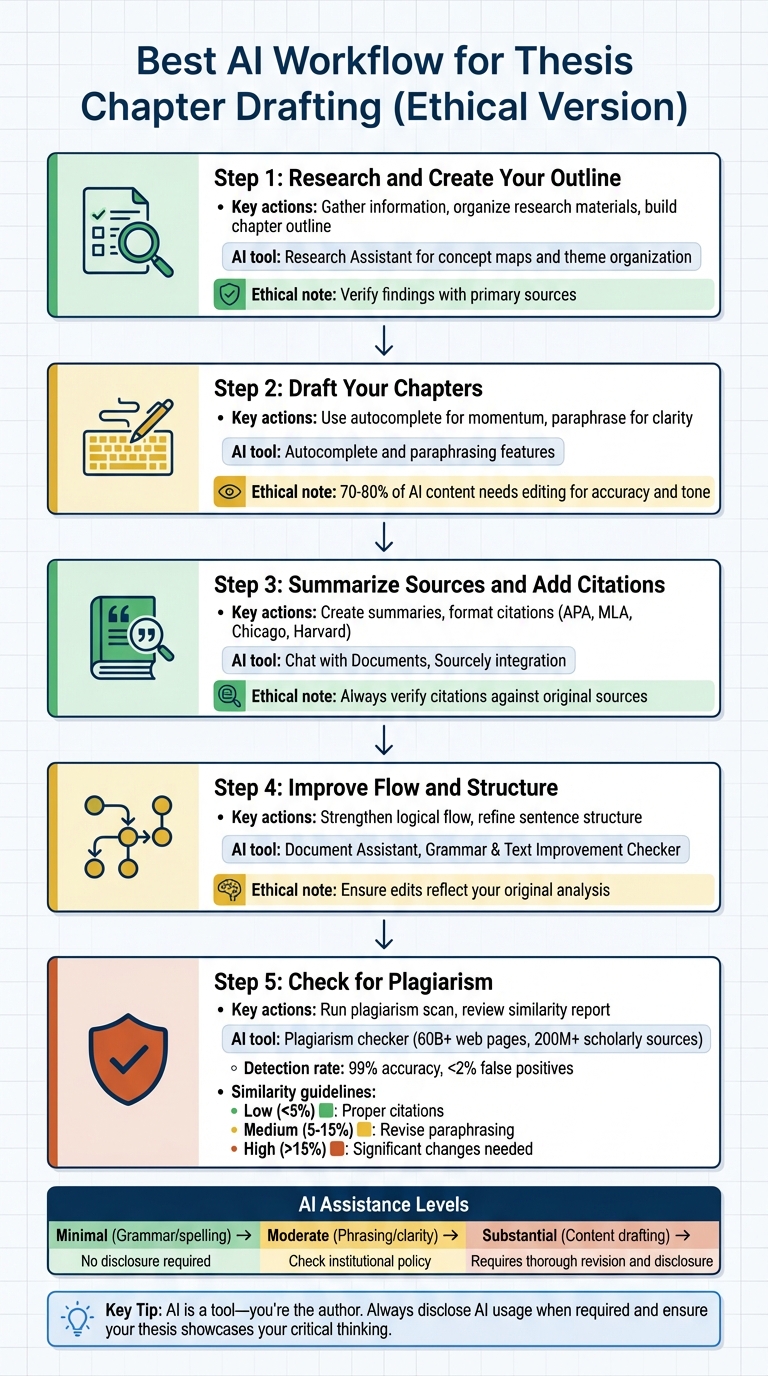
5-Step Ethical AI Workflow for Thesis Chapter Drafting
The AI Thesis Writing System That Cuts Your Workload in Half
sbb-itb-1831901
Step 1: Research and Create Your Outline
Before diving into writing your thesis chapter, it's crucial to lay a strong foundation. Starting with thorough research and a clear outline helps you avoid writer's block and ensures your arguments follow a logical structure. A well-planned outline acts like a roadmap, guiding you through essential sections like methodology, literature review, and analysis.
Gather Information for Your Topic
Platforms like Yomu AI can assist in collecting and organizing research materials. Designed specifically for academic purposes, it provides ethical prompts to help you explore your topic. For example, if you're researching "urban migration", Yomu AI might suggest subtopics such as "climate change impacts" or "socioeconomic factors in Europe." This tool can clarify complex concepts and reveal fresh perspectives, but always verify findings with primary sources.
"Yomu.ai provides tailored AI writing assistance with built-in ethical guidelines, specialized academic prompts, and tools designed specifically for educational contexts." - Daniel Felix, Author
You can also use Yomu AI to organize your research notes into themes or categories, helping you identify gaps in your materials. Its Research Assistant feature can even create concept maps or highlight patterns within your literature. However, it’s essential to manually analyze these outputs to ensure your critical thinking remains central to your work.
"AI at this stage serves primarily to expand your thinking rather than replace it." - Yomu.ai
Once your research is categorized and themes are clear, you’re ready to move on to creating a detailed outline.
Build Your Chapter Outline
With your research in hand, the next step is to structure it into a coherent outline. This outline should reflect your original insights while adhering to ethical academic practices. Yomu AI's Document Assistant can help draft a preliminary outline based on your thesis statement or research question, offering subheadings like Introduction, Literature Review, Methodology, and Analysis. This can be a great way to overcome the dreaded blank page.
Treat the AI-generated outline as a starting point. Refine it by incorporating your unique research goals, data, and ideas. For example, if the initial structure feels too generic, adjust the sequence of sections to align with your university's specific formatting requirements or add arguments that showcase your original thinking. Research indicates that having a structured outline can reduce revision time by 30–50% in academic writing, as it minimizes the chances of drafting disorganized content.
Step 2: Draft Your Chapters with Autocomplete and Paraphrasing
Now that your outline is ready, it's time to bring it to life. Facing a blank page can feel daunting, but tools like autocomplete and paraphrasing can help you get past writer's block and keep your ideas flowing.
Write Faster with Autocomplete
Yomu AI's autocomplete feature offers suggestions for sentences and paragraphs, helping you maintain momentum without straying from your original ideas. For instance, if you're writing about the effects of climate change, you might start with:
"Climate change has profoundly affected coastal ecosystems by…"
The tool might suggest completing it as:
"altering biodiversity patterns through rising sea levels and intensified storms, as evidenced by…"
"Yomu AI revolutionizes academic writing by streamlining the process and improving essay/paper quality. Its intelligent document assistant and AI autocomplete ensure a seamless writing experience, eliminating any writer's block."
– Moha Khozi
Aamir Hussain, a researcher and content creator, also praised the tool, saying:
"Yomu.ai is truly the whole package for me... It is by far the best AI writing tool to supplement your existing writing workflow."
While autocomplete can save time, always review and refine its suggestions. This feature is best for improving phrasing, transitions, and clarity - not for crafting your core arguments or analysis. It's especially useful for non-native English speakers, offering polished grammar and more precise word choices while keeping your original ideas intact.
Once you've drafted your sections, use paraphrasing to polish them and ensure clarity.
Paraphrase Content Responsibly
Paraphrasing is another powerful tool to refine your drafts. Yomu AI's paraphrasing feature can help rework awkward sentences or improve readability. It restructures phrases and substitutes synonyms without altering the original meaning. For example, if your draft says:
"Machine learning algorithms often exhibit biases inherited from training data,"
the paraphrasing tool might suggest:
"Training data frequently imparts biases to machine learning models."
As with autocomplete, always review paraphrased content to ensure it aligns with your original intent. Overusing paraphrasing can lead to text that feels overly generic or deviates from your intended meaning. Use it selectively - focusing on areas where clarity is needed rather than reworking entire sections. To maintain academic integrity, run paraphrased content through Yomu AI's plagiarism checker.
Academic writing guides emphasize that 70–80% of AI-generated content typically needs editing for accuracy and tone. So, while these tools can streamline your process, the final touch should always come from you.
By combining autocomplete and paraphrasing, you can create a more efficient workflow. Use autocomplete to draft sections quickly, apply paraphrasing to refine tricky phrases, and then integrate your unique insights and citations. This ensures your writing stays polished and personal while benefiting from AI assistance.
| AI Assistance Level | Usage | Ethics |
|---|---|---|
| Minimal | Grammar, spelling, punctuation | Generally requires no disclosure |
| Moderate | Phrasing, clarity, sentence structure | Improves expression; check institutional policy for disclosure |
| Substantial | Content suggestions, section drafting | Requires thorough revision and explicit disclosure |
Step 3: Summarize Sources and Add Citations
Once you've gone through the ethical drafting and reviewing steps, it's time to pull everything together by summarizing sources and ensuring citations are accurate and properly formatted. Tools like Yomu AI can make this process smoother by helping you extract key details from academic papers and automate citation formatting across various styles.
Create Summaries of Key Sources
Going through multiple research papers to identify the most relevant ones can feel like an uphill battle. Yomu AI's Chat with Documents feature simplifies this by allowing you to upload PDFs and ask specific questions directly about the content. For instance, instead of reading an entire 40-page paper, you can ask targeted questions like, "What methodology did the authors use?" or "What were the main findings related to climate adaptation?" The tool quickly pulls out summaries and answers, helping you decide whether a source merits deeper exploration.
Additionally, Yomu AI offers a "Summarize" command that condenses lengthy sections of text into bite-sized summaries. This can be especially handy when you're dealing with complex frameworks or integrating diverse viewpoints into a literature review. By summarizing the essentials, you can avoid overwhelming your readers with unnecessary detail.
That said, always double-check AI-generated summaries against the original material. In one evaluation, AI writing aids were found to have "problematic" citation accuracy, occasionally mixing real references with fabricated ones. To avoid missing critical context, review the original abstract or conclusion yourself. Dr. Rebecca Sharma, a PhD thesis evaluator at Stanford, noted:
"The citation problems alone would make this unacceptable in an academic context, but even setting those aside, this wouldn't pass muster as a chapter in a defended dissertation without substantial human input and revision."
Treat AI-generated summaries as a starting point. Use them to gather initial insights, but rely on your own critical thinking to analyze, synthesize, and connect ideas across sources. Once your summaries are ready, you can move on to ensuring that every reference is cited accurately. This is also the ideal time to check your academic paper for plagiarism to ensure all integrated ideas are properly attributed.
Format Citations Correctly
After summarizing your sources, it's crucial to format citations properly to maintain academic integrity. Yomu AI, powered by Sourcely, can search academic databases for peer-reviewed sources and automatically format them in styles like APA, MLA, Chicago, or Harvard. For instance, if you're writing about the impact of remote work on productivity, you can search for evidence directly within the editor. The tool will insert in-text citations and automatically update your bibliography, saving you time on manual formatting.
To streamline the process, select your required citation style - such as APA 7th Edition - at the start. This ensures that all citations are consistent from the get-go and avoids the hassle of reformatting later.
However, always conduct a final manual review of all citations. Check details like DOI numbers, publication years, and author names for accuracy. Use trusted databases like Google Scholar or your university library to verify the information. As Maria Chen, a PhD student, advises:
"I always verify every citation independently and consider AI output as a first draft at best. The intellectual heavy lifting still requires human expertise and creativity."
Yomu AI also allows you to save frequently used sources in a personal library, making it easy to reuse them across multiple sections or chapters. This feature can be a lifesaver for thesis writers who frequently cite the same foundational studies.
| AI Assistance Level | Usage | Verification Required |
|---|---|---|
| Summarization | Extract key findings from sources | Always cross-check against the original text |
| Citation Formatting | Automate APA, MLA, Chicago styles | Manually verify metadata and DOI accuracy |
| Source Discovery | Find relevant academic papers | Confirm sources exist and are peer-reviewed |
Step 4: Improve Flow and Structure with Feedback Tools
Once you've drafted your chapters and included citations, the next step is fine-tuning the flow and structure of your writing. Yomu AI's feedback tools are designed to help identify weak points in your draft, ensuring your ideas connect smoothly and your analysis remains clear. Think of these tools as an extra set of eyes, pointing out where transitions could be smoother or sentences might need clarification.
Strengthen Logical Flow
Transitions are key to maintaining a cohesive argument. If your sections or paragraphs jump abruptly from one idea to another, even the strongest research can feel scattered. Yomu AI's Document Assistant analyzes your draft and flags areas where the flow might be choppy. For instance, if you leap from discussing economic costs to highlighting social benefits without a clear segue, the tool might suggest transitional phrases like "However, despite these economic costs..." or "Expanding on this idea..." to create a more seamless connection.
Interestingly, a 2024 study rated AI systems as "Strong" in identifying and improving thematic coherence. This means you can rely on tools like Yomu AI to help pinpoint breaks in logical flow. Simply paste a section of your text into the editor, activate the flow analysis feature, and review the feedback. The AI might highlight repetitive ideas or suggest reorganizing evidence for better clarity.
It's important to remember that these suggestions are just a starting point. Always revise the AI's recommendations to ensure they align with your unique voice and argument. As Maria Chen, a PhD student, puts it:
"I use AI to help me create initial organizational structures and draft sections where I already know the content well."
Once the overall flow feels solid, it's time to focus on polishing individual sentences and paragraphs.
Refine Sentence and Paragraph Structure
With the transitions smoothed out, the next step is refining sentence and paragraph clarity. Yomu AI can help by identifying common issues like overly long sentences, excessive use of passive voice, or informal phrasing. For example, it might flag a sentence like "The data was analyzed by researchers" and suggest a more straightforward revision: "Researchers analyzed the data." These edits make your writing sharper and more professional.
The Academic Plagiarism Detector and Text Improvement Checker offers more than just basic spell-checking. It ensures your writing meets academic standards by flagging overly complex paragraphs (e.g., those exceeding 150 words) and suggesting ways to break them down. You can also use commands like "Shorten", "Expand", or "Paraphrase" to adjust sentence length and complexity, depending on the needs of your section.
Another helpful feature is the ability to turn bullet points into well-structured paragraphs. If you've outlined your ideas in note form, Yomu AI can transform them into cohesive text with proper topic sentences and logical flow. Of course, you'll need to carefully review these suggestions. Dr. Rebecca Sharma, a professor at Stanford, emphasizes this point:
"AI covers fundamental territory adequately and organizes information coherently, but it still requires substantial human input and revision to meet dissertation standards."
Ultimately, while Yomu AI can refine your draft and streamline your structure, the final responsibility lies with you. Ensure every edit reflects your original analysis and maintains your unique perspective.
Step 5: Check for Plagiarism
Once you've polished your chapter, the next step is to ensure it’s original and maintains academic integrity. This involves verifying the content’s uniqueness and confirming proper citation practices. With Yomu AI's built-in plagiarism checker, you can handle this task directly within the platform, eliminating the hassle of using separate software tools.
This feature scans your chapter against an extensive database of over 60 billion web pages and 200 million scholarly sources to identify direct copies, paraphrased sections, or mosaic plagiarism.
Run a Plagiarism Scan
Running a plagiarism check in Yomu AI is simple. After completing your draft in the editor, locate the plagiarism checker under the "Tools" or "Check" menu. Choose the databases you want to scan against, such as academic journals, theses, websites, or student papers. Then, start the scan. For drafts up to 10,000 words, results are typically ready in under one minute.
The tool is highly accurate, detecting up to 99% of plagiarized content with a false positive rate of less than 2%. This helps significantly reduce the risk of plagiarism. In fact, approximately 70% of institutions now require such scans before final submissions. Once your scan is complete, the next step is to review and interpret the report to address any flagged areas efficiently.
Understand Your Plagiarism Report
The plagiarism report provides an overall similarity score (e.g., "3% plagiarism risk" or "87% original") along with detailed, color-coded highlights. Red highlights indicate high-risk matches that require immediate attention, while yellow flags point to lower-risk similarities. Each highlighted section links to a preview of the matched source, and the report organizes results by section - for example, showing that 2% of the content comes from properly cited quotes and 1% from paraphrased material.
Here’s how to interpret the similarity levels:
- Low similarity (under 5%): This typically reflects proper citations or common academic phrases. Double-check these matches and add quotation marks if needed.
- Medium similarity (5–15%): This suggests unintentional paraphrasing, where you may have followed a source too closely. Revise these sections in your own words and ensure proper citations.
- High similarity (over 15%): These areas require significant changes or removal of the flagged content.
For added transparency, document your scan results. For instance, you can note something like, "Yomu AI scan on March 21, 2026, showed 2% similarity" in your records. This step complements your earlier efforts to use AI responsibly while maintaining the integrity of your academic work.
Ethical Guidelines for Using AI in Academic Writing
When it comes to using AI in drafting academic work, maintaining ethical standards is non-negotiable. It's perfectly fine to use AI tools to help draft your thesis chapters, but the key is to ensure the final product reflects your own understanding and intellectual effort. Think of AI as an assistant, not the author. You remain in charge - verifying all claims, making final decisions, and taking full responsibility for the content. Your thesis should primarily showcase your critical thinking and original ideas, with AI simply helping to refine how you express them.
To stay on the right side of ethics, evaluate whether AI usage interferes with the core skills your thesis is meant to develop. For example, if the tool is handling tasks like analyzing data or building arguments, then it’s doing the heavy lifting that you should be doing. Instead, AI should be reserved for tasks like improving grammar, spelling, or style. This approach ensures that your unique insights and contributions remain at the heart of your work.
Balance AI Help with Personal Effort
Balancing AI assistance with your own intellectual effort is crucial. Keep a record of your drafting process to demonstrate how your ideas evolved. This documentation can serve as proof of your academic integrity and show that your thesis is genuinely your own work. Also, double-check AI-generated content against primary sources to ensure accuracy, catch potential errors, and verify citations. AI tools can sometimes "hallucinate" or fabricate information, so it's essential to remain vigilant.
Think of AI usage as a spectrum. Minimal help, such as proofreading or grammar checks, is generally low-risk and doesn't usually require disclosure. Moderate help, like brainstorming or outlining, should be acknowledged in your methodology or notes. However, substantial help - like drafting entire sections - requires explicit disclosure and significant revisions to ensure the work aligns with your own ideas. Using AI to generate complete content is typically considered academic dishonesty in most academic environments.
Disclose AI Usage When Required
Institutional policies on AI use can vary widely, so it’s important to review your university's guidelines or consult your advisor. When in doubt, err on the side of transparency. If your institution requires disclosure, include a clear statement explaining how AI assisted you. The Committee on Publication Ethics (COPE) emphasizes that disclosing AI usage is essential for maintaining transparency in academic research.
Tailor your disclosure based on the level of AI involvement. For minimal assistance, you might write: "I used AI language tools for proofreading and minor language refinement. All ideas, research, and substantive content remain entirely my own work." For moderate help, you could say: "AI tools were used to assist with brainstorming initial research questions and creating a preliminary outline. The final direction, research, and writing were conducted independently." If the assistance was substantial, acknowledge it clearly: "Sections [X] and [Y] were initially drafted with AI assistance and subsequently revised and expanded to incorporate my own analysis and research findings."
Conclusion
Leveraging AI to draft thesis chapters can save time and simplify the writing process without compromising academic standards. This guide has outlined a thoughtful, AI-assisted workflow that supports key tasks like creating outlines, drafting content, summarizing sources, using citation generators, and running plagiarism checks. By automating these repetitive tasks, you can focus more on the intellectual work that defines your thesis.
The key takeaway is that AI should complement your efforts, not replace them. Tools like Yomu AI's autocomplete for smoother transitions or its paraphrasing feature for refining your language are there to assist - not substitute - your critical thinking, research, and argument development. Features like plagiarism detection and citation management ensure that your work maintains proper attribution and academic integrity.
Remember, your thesis is a reflection of your unique perspective and analysis. AI can streamline the drafting, editing, and citation processes, but your voice and insights must remain at the forefront. Always review and revise AI-generated content to align with your original ideas. Check your institution’s policies on AI use, and when in doubt, prioritize transparency.
FAQs
How much AI help is considered “too much” for a thesis?
Using AI for a thesis crosses the line when it substitutes your own ideas or analysis instead of complementing them. Ethical applications include tasks like checking grammar, paraphrasing, or formatting citations. However, relying on AI to generate entire sections without your input or oversight can undermine the integrity of your work. Always follow disclosure requirements for AI use and ensure your thesis represents your personal insights and critical thinking to uphold academic standards.
What should I disclose about using AI in my thesis?
When working on your thesis, it's important to disclose any use of AI tools. Being upfront about this ensures transparency and reflects a commitment to academic integrity. It also shows that you're adhering to ethical research practices and respecting the academic standards for originality and honesty.
How do I verify AI-generated citations and summaries?
To ensure the accuracy of AI-generated citations, start by double-checking details such as the authors, publication dates, and URLs against the original sources. When dealing with summaries, compare the AI-generated content with the original material to confirm it accurately reflects the main ideas. Additionally, manually review the citations to ensure they meet the formatting guidelines required by your institution. These practices are crucial for maintaining academic integrity through accurate representation and proper attribution.