

Best AI for Academic Writing: What Students Should Actually Look For
Yomu AI is an all-in-one platform that excels in these areas, combining essential tools to streamline academic writing. With a citation accuracy rate of 97.8% and support for 43 styles, it simplifies referencing and citation management. Its advanced features, like "Write In-Depth" for drafting and "Academise" for formal tone, save time and improve quality. The built-in plagiarism detector ensures originality, while its user-friendly design reduces disruptions.
Key Features:
- Autocomplete: Drafts paragraphs in real time using academic language.
- Paraphrasing & Summarization: Refines tone and grammar with tools like "Academise" and "Fix Fluency."
- Citation Management: Supports 43 styles with minimal errors (0.3% rate).
- Plagiarism Detection: Highlights similarities and sources for easy revision.
- Export Options: Compatible with Word, PDF, and LaTeX formats.
Pros:
- Combines multiple tools into one platform.
- High citation accuracy and easy reference generation.
- Affordable starter plan at $9/month.
Cons:
- Feedback isn’t sentence-specific.
- Collaboration tools are limited.
- Advanced features may take time to master.
Yomu AI is a practical choice for students seeking a unified solution to academic writing challenges. It’s designed to assist, not replace, your efforts - helping you stay efficient and focused on your work.
1. Yomu AI
Yomu AI combines several tools into a single platform, making academic writing more efficient. It offers features like autocomplete, paraphrasing, summarization, citation management, and plagiarism detection. Let’s break down how these tools work and why they’re useful.
Autocomplete
This feature helps you write faster by completing sentences and paragraphs in real time. It uses scholarly data to ensure the tone and language match academic standards. The "Write In-Depth" option is particularly handy - it takes your bullet points and transforms them into well-organized paragraphs, saving you time and effort when drafting.
Paraphrasing & Summarization
The Academise tool turns casual language into formal academic writing while keeping the original meaning intact. Need to improve grammar or style? The "Fix Fluency" tool is perfect for refining rough drafts or turning quick notes into polished text.
"Yomu.ai is truly the whole package for me... the amount of features and the ease of use to utilise them has been a game changer for me." - Aamir Hussain, Researcher/Content Creator
Citation Management
Yomu AI’s Sourcely tool makes referencing simple. It supports 43 citation styles, including APA 7th and MLA 9th, and has an impressively low citation error rate of just 0.3% (compared to the industry average of 8.7%). References are automatically compiled into a list at the bottom of your document, and you can save sources to a library for future use.
Plagiarism Detection
The plagiarism scanner for academic papers ensures originality by comparing your text to online sources. It highlights any matches and identifies the original source, making it easy to revise without leaving the editor. This keeps your work clean and credible.
sbb-itb-1831901
Pros and Cons
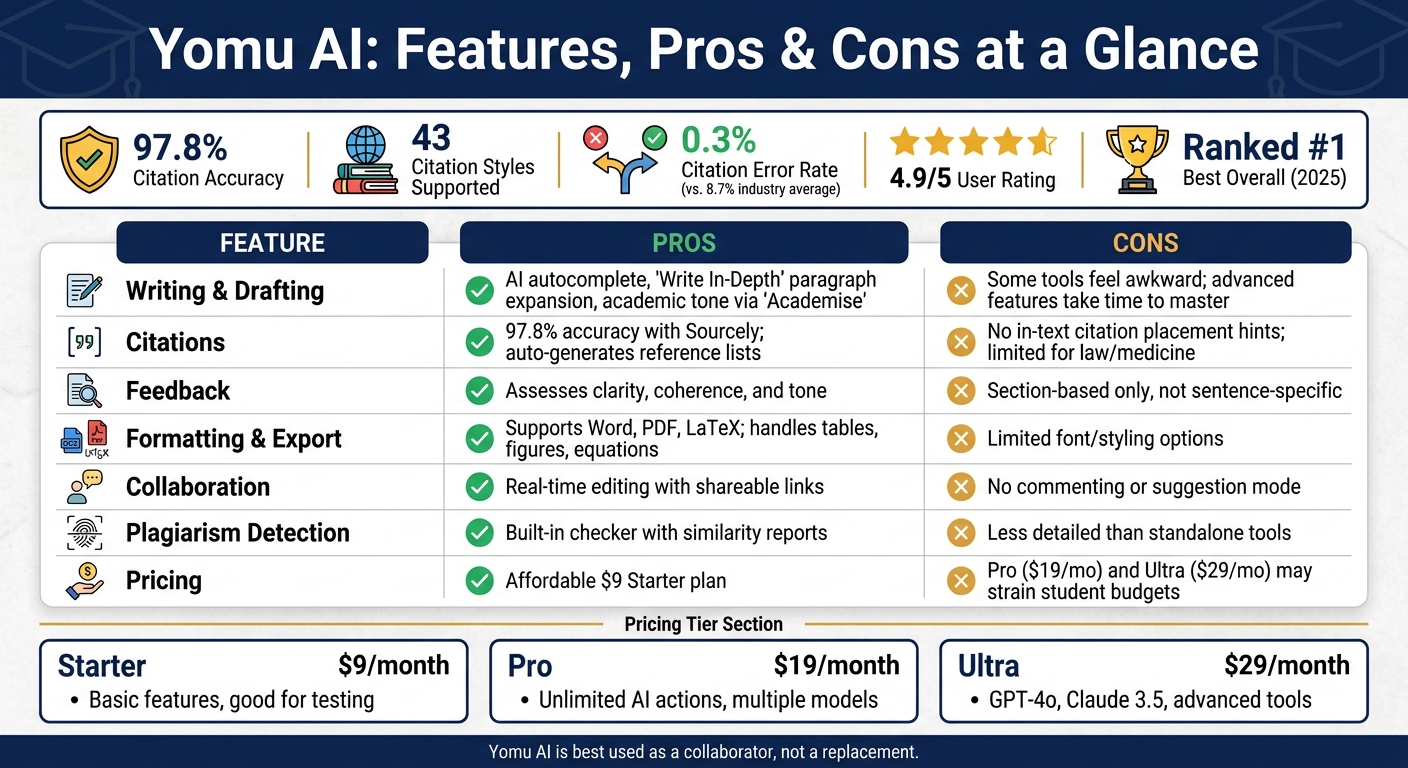
Yomu AI Features: Pros, Cons & Pricing at a Glance
Yomu AI provides a range of academic writing tools, offering both benefits and challenges. Here's a closer look at its standout features, along with their strengths and limitations:
| Feature | Pros | Cons |
|---|---|---|
| Writing & Drafting | Includes AI autocomplete, "Write In-Depth" for expanding paragraphs, and academic tone adjustments via "Academise" | Some tools feel awkward to use; advanced features require time to master |
| Citations | Achieves 97.8% accuracy with Sourcely; automatically generates reference lists | Doesn't highlight where citations should go within your text; lacks depth for specialized fields like law or medicine |
| Feedback | Assesses clarity, coherence, and tone across your document | Feedback is section-based, not tied to specific sentences, making it harder to apply suggestions effectively |
| Formatting & Export | Supports Word, PDF, and LaTeX exports; handles tables, figures, and equations | Limited options for fonts and styling; may require additional formatting in Word |
| Collaboration | Enables real-time editing with shareable links | Lacks features like commenting or suggestion mode for team collaboration |
| Integrity | Includes a built-in plagiarism checker with similarity reports | The checker isn't as detailed as standalone plagiarism detection tools |
| Pricing | Offers an affordable $9 Starter plan | Pro ($19/month) and Ultra ($29/month) plans are relatively expensive for students on tight budgets |
One of Yomu AI's standout advantages is its all-in-one workflow, making it a time-saver for students balancing multiple deadlines.
However, its feedback system leaves room for improvement. As one reviewer noted:
"The feedback is organised by section, but not linked to specific sentences, which can make it difficult to identify where the feedback is relevant."
It's worth mentioning that Yomu AI is tailored to academic and research writing, so it isn't the best fit for creative or marketing-focused content.
Conclusion
Yomu AI brings together all the tools students need to manage their academic writing workflow in one place. From drafting and citation management to plagiarism checks and seamless exports, it eliminates the hassle of switching between multiple apps.
With a 97.8% citation accuracy rate and a 4.9/5 user rating, Yomu AI has proven its reliability. It was even ranked #1 "Best Overall" for undergraduate and graduate students in 2025 evaluations. While features like feedback and collaboration could be refined, its core functionality stands out.
The pricing plans make it accessible to a range of users. The $9 Starter plan is great for testing the platform. For regular use, the Pro plan at $19/month (billed annually) offers unlimited AI actions and access to multiple models. For those who need cutting-edge tools, the Ultra plan at $29/month includes advanced models like GPT-4o and Claude 3.5.
These features and pricing options highlight Yomu AI as a trustworthy academic tool. However, it’s important to remember that Yomu works best as a collaborator, not a shortcut. As Daniel Felix, author, puts it:
"AI writing assistants are designed to amplify your voice, not replace it. The most productive approach treats these tools as collaborators rather than replacements."
If you're a student seeking a dependable, all-in-one academic writing assistant, Yomu AI is a solid choice to support your academic journey.
FAQs
How can I use AI without crossing academic integrity rules?
To ensure ethical use of AI in academic writing, it's important to be transparent about when and how tools like Yomu AI are used - whether for tasks like paraphrasing or managing citations. Always give proper credit for AI-generated content, double-check its accuracy, and adhere to your institution's policies. If no specific guidelines exist, create personal rules that emphasize originality and critical analysis. This practice not only promotes honesty but also helps avoid accidental breaches of academic integrity.
What should I do to verify citations before I submit my paper?
AI-powered citation tools can simplify the process of checking and validating your sources. These tools help ensure your citations are accurate and formatted correctly for styles like APA, MLA, or Chicago. Many also verify key details like author names, publication dates, and URLs, reducing the risk of errors.
However, it's important to manually review the citations they generate. Double-check for correctness and make sure they align with the specific requirements of your chosen citation style before submitting your work.
When should I use autocomplete vs. paraphrasing vs. summarizing?
Autocomplete lets you complete sentences or phrases faster, helping you maintain your writing flow and save time. Paraphrasing is perfect for rewording content to make it clearer, match a specific tone, or steer clear of plagiarism while preserving the original intent. Summarizing takes longer pieces of text and distills them into brief, focused overviews that highlight the main ideas. Use autocomplete to draft efficiently, paraphrasing to polish your work, and summarizing to break down complex details into simpler insights.